Tweets on the Times: “Getting” Social Media, or Not?

While I generally don’t like the dismissive attitude embodied in the assertion that a person or organization doesn’t “get” something, a couple of recent tweets relating to the New York Times and social media make me at least ask the question.

As I was checking my Tweetdeck on the bus this morning, I noted this tweet from Jeremiah Owyang (@jowyang):
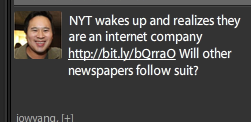
…which linked to this article about the NY Times hiring 12 techies and a social media whiz. That was encouraging to read, but as I scrolled down a bit through last night’s #Oscars tweets I came across this one from Jay Rosen (@jayrosen_NYU):
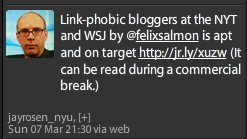
…which linked to this post about the reasons behind a plagiarism problem at the Times, and how the culture there and at the Wall Street Journal is antithetical to the world of social media. Felix Salmon’s (@felixsalmon) post (to which I have added emphasis) begins as follows:

Clark Hoyt, the NYT’s public editor, has a good post-mortem on l’affaire Zachary Kouwe, and asks whether “the culture of DealBook, the hyper-competitive news blog on which Kouwe worked” was partly to blame for his plagiarism.

It’s a good question, but also a dangerous one, because I fear it will help to keep blogs marginalized at the NYT and elsewhere: is there something inherent to the culture of blogging which breeds a degree of carelessness ill suited to a venerable newspaper?

The answer, in truth, is not that the NYT has gone too far down the bloggish rabbit hole, but rather that it hasn’t gone far enough. Kouwe was a reporter for the newspaper as well as for Dealbook, and as far as I know he has never had a blog of his own before or since. Big mainstream-media publications, when they hire people to write their blogs, generally hire people with no blogging experience at all — something which is both ill-conceived and dangerous. Some journalists make good bloggers; most don’t. So rather than gamble that you’ve found one of the rare exceptions, why not make prior blogging experience a prerequisite for such positions?

The fundamental problem with Kouwe was that when he saw good stories elsewhere, he felt the need to re-report them himself, rather than simply linking to what he had found, as any real blogger would do as a matter of course.

I hope the actions highlighted in Jeremiah’s tweet mean that the Times will begin to change its approach and will start linking externally. Bringing in some fresh people who don’t have the print reporter mindset may help. But if the paper’s policy against linking externally remains, it will hasten the Times‘ decline, for two reasons:

  1. There will inevitably be additional plagiarism incidents, as print culture tries (and fails) to keep up with the speed of the Web. This will lead to further embarrassment and reduced respect for the Times.
  2. By trying to re-write everything (to avoid linking), the Times will be wasting effort to be later with its reports than it would be if it immediately linked. So people will go elsewhere for timely news.

This post took less than half an hour on the bus. I could have tried to rewrite arguments, but what good would that have done? Excerpting and linking is both the right thing to do and the smart thing to do. It’s wasteful for print media to expend so much energy to avoid giving other people credit.

Hopefully the new social media whiz the Times is hiring will help management understand that.

Facebook 120: Creating a Facebook Group

Groups enable Facebook’s 400 million monthly active users to congregate and interact in discussions related to a subject, even if they aren’t “friends” with all (or even any) of the other members.

Groups in Facebook are different from Pages and even personal Profiles.

  • Profiles are for individuals…for real people. These are the basic user accounts everyone from students to grandparents create. You cannot create a Group unless you have first joined Facebook by creating your personal profile.
  • Pages are for organizations, or brands. In our Mayo Clinic context, we have one Facebook “fan” page.
  • Groups are the means to create connections among people with common interests, and are the way to create communities in Facebook. The rest of this post will take you through the process of creating a Facebook group.

I established the Facebook Group Users Group as a way for people to get guidance on setting up Facebook groups. Please feel free to join it. In a moment, I will take you step-by-step through the process of setting up a group, using the Facebook Group Users Group as an example.

But first, here are some of the key issues you need to decide when setting up your group:

Should it be limited to one of your networks, or open to all of Facebook?

This is a different question than the Open/Closed/Secret one below. If you limit the group to only the Mayo Clinic College of Medicine network, for instance, only people with a Mayo.edu email address will be able to join. Once you decide, you can’t change your mind, so I generally recommend making it open to all of Facebook. You can still limit access by making the group Closed or Secret, but once you’ve chosen to limit to a network you can’t later make it more open.

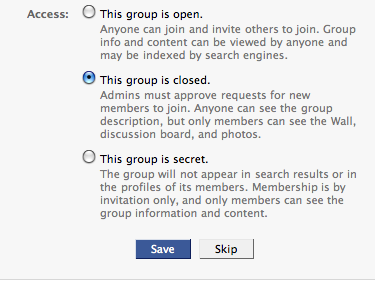
Should it be Open, Closed or Secret?

  • An Open group is the easiest to administer, because anyone can join it without being invited or getting approval from a group administrator. If you want to build a group quickly and if confidentiality of information shared isn’t a concern, open is the way to go.
  • Anyone can see basic information about a Closed group (and can request to join), but wall posts, discussions and photos are limited to members. Group creators or administrators can invite their Facebook friends to join. If you have some need to limit access to the conversations and group membership, Closed is a good option. As administrator, you will get a Facebook message whenever someone requests to join, which you can approve or deny.
  • A Secret group is the most confidential option, but also the most difficult to form. The only way people can join is by being invited, because the group won’t show up in public listings or on anyone’s individual profile. To invite someone to the group, you need to be their friend in Facebook (or invite them via email through the group.)

One short-term option you can use is to start the group as Open or Closed, and then once everyone has joined you can switch it to Secret.

How to set up your Facebook Group

Note: Click any of the images below to see a larger version.

From your Home page in Facebook, click on the Groups link in the left column navigation:

Then at the top of the page you will see a button that says “Create a Group.” Click it.

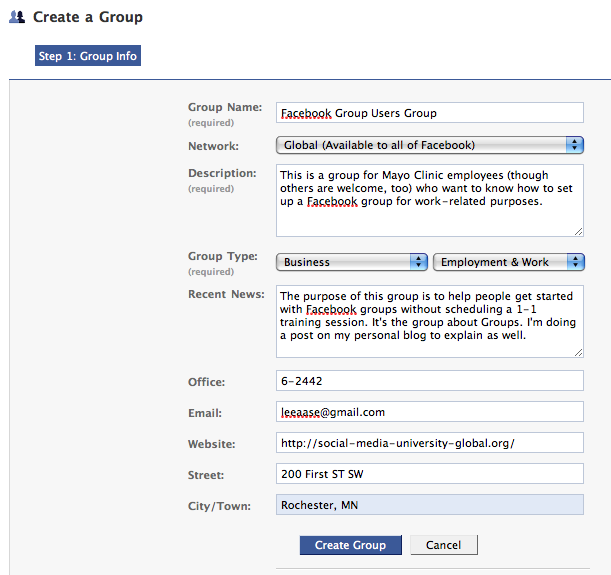
This will bring you to the first page of group set-up, for which I have inserted below the screen shot of the settings I used for the Facebook Group Users Group.

A few points:

  • Except in unusual circumstances, you will want to make the group “Global (Available to all of Facebook) under the Network setting. You can still manage who is allowed to be a member of the group via the Closed or Secret settings in the next step, but once you limit to a particular network you are forever barring people outside of that network from joining. If, however, you want a group to only be available to members from your workplace (or school), you could limit to one of your networks. But once you decide that, you can’t change it.
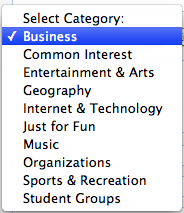
  • Take time to choose your Group Type and sub-type. With each of the Categories, there are different options for sup-type. Here is a listing of the Categories:

  • Choose a meaningful title and add a good description of the group. This will make it more likely that if friends of your group members see the group, they will find it interesting and decide to join.

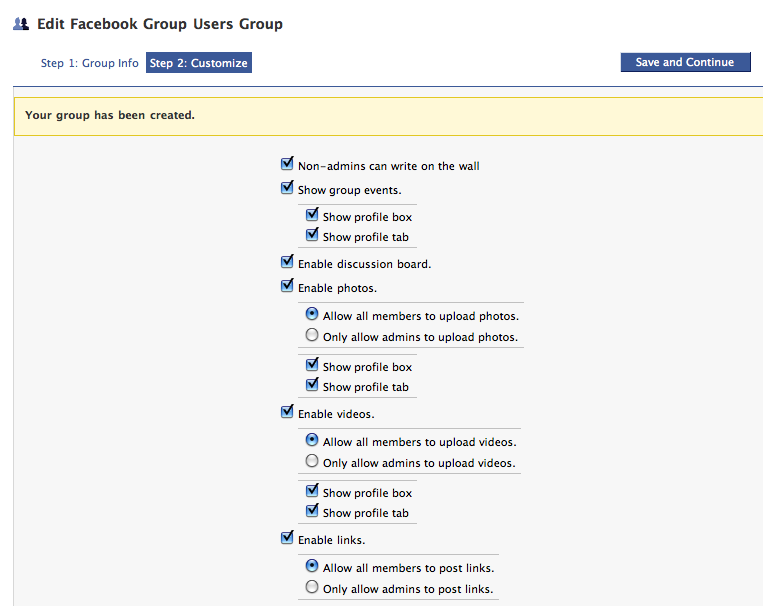
When you click the “Create Group” button on the bottom of the first page, you will go to a second page that enables you to set options for who is able to post to the group’s Wall, or upload photos and videos. Unless you have a specific reason to be more exclusive, I recommend enabling anyone who is a member of the group to write on the wall and upload photos and video.

The goal is interaction, after all.

On this same page, you will be able to choose whether the group is Open, Closed or Secret (as described above.) Here is what that choice looks like:

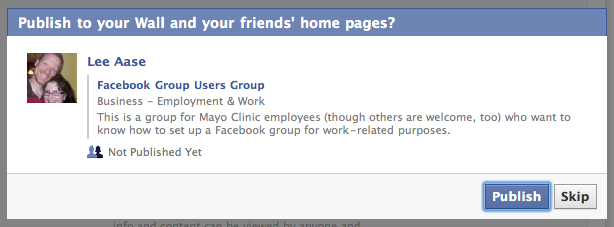
When you hit the “Save” button, you will be asked whether you want to publish a notification to the wall of your personal Profile and to your friends’ home pages. It will look like this:

If you want the world to know that you have created this group so others will be encouraged to join, hit the Publish button. If you only expect to invite a limited number of people to join (as in the example of an online focus group or patient support group), hit “Skip.”

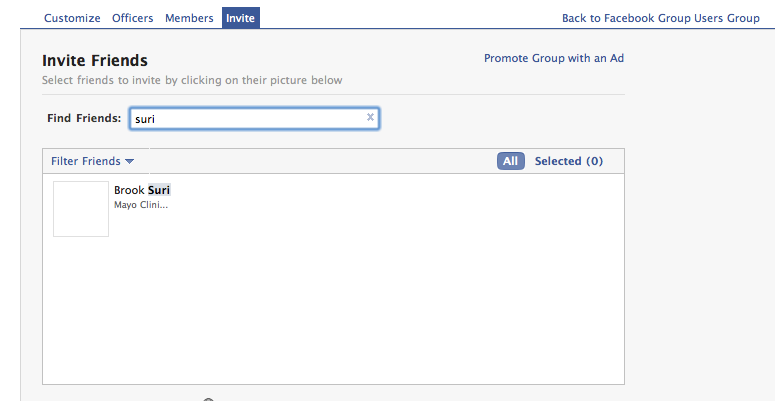
In Step 3, you get to invite your friends to join the group.

Just start typing their names (or you also can invite an entire friend list), and when their names show up you can click on their picture to select them. After you have selected all those you would like to invite (and added any message describing the group and why you invited them), you can send the invitations and go back to the front of the Group.

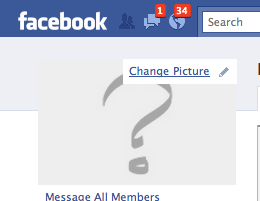
From there, you can upload a picture to represent the group, as you see below.

It’s a pretty straightforward interface; I decided for the Facebook Group Users Group to upload a screen shot of the first step in creating a group. The picture you choose should be meaningful for your group.

That’s really all there is to creating a group in Facebook. In a separate post, I will highlight some of the basic interaction steps within a group, and how you can further customize it to be most useful.

Cowans Make the News

Marlow and Fran Cowan, the elderly couple from Ankeny, Iowa whose piano duet at Mayo Clinic has gone “viral” in the last year (to the tune of more than 6.6 million views to date on YouTube), were the subjects last night of an extended feature on KARE TV in Minneapolis-St. Paul:

The Minneapolis Star Tribune also has a nice article about the Cowans in this morning’s edition.

You can watch and listen to several musical selections from the Cowans’ Feb. 24 return concert at Mayo Clinic on the Mayo Clinic channel on YouTube.

“Quality” in Media = Usefulness

Advertising Age had an interesting article Wednesday – “Lowered Expectations: Web Redefines ‘Quality’” – regarding the challenges big media conglomerates have in a world in which publishing has been democratized. Here a couple of relevant excerpts:

Publishers from The New York Times to Condé Nast to NBC have been arguing for years that, ultimately, demand for quality would give them advantages over online upstarts: Users would demand it and advertisers would always covet the environment that quality can confer.

But they’re facing two trends that appear to be inexorable. Audiences that do not intently seek out quality are increasingly inured to traditional media brands on the web. At the same time, agencies and advertisers are adopting technologies that allow them to target individuals independent of whatever media they may be absorbing, making the media brand itself less important, perhaps even irrelevant.

“Today there seems to be a bigger premium on popularity — substantiated or not — than there is on authority,” said Group M CEO Rob Norman.

Big, established brands are the ones that least need the authority of media, and indeed many are adapting to a diminished world of old media by producing their own content. Where it starts to hurt are smaller brands that don’t have those advantages. Mr. Norman said it tends to be smaller brands that rely on the “the conferred quality, authority and scale of more traditional media forms to deliver brand messaging or persuade audiences.”

While I think this article highlights an important trend (that of quality being judged by average users instead of elites and big media brands), I have a bit of a different take. I agree that big brands that already have a substantial degree of trust have a great opportunity to create content and reach consumers directly, but I don’t see that smaller brands are terribly disadvantaged. They have an opportunity through the Web to reach “audiences” or “communities” directly, just as the more established brands do.

But whereas Mr. Norman says the new standard of quality seems to be “popularity” as opposed to “authority,” I think the real standard to be met is usefulness and trustworthiness. Web publishing enables real experts (for example, physicians and scientists) to contribute content, as an alternative to journalists and the mainstream media. So it’s not always popularity vs. authority; it can equally be one kind of authority (medical, scientific) vs. another type of authority (journalistic objectivity.)

The real opportunity for those who have been advertising is that instead of paying to interrupt consumers of quality media content with unwelcome marketing messages, they can produce content of their own that people actually want. That they find useful.

RAQ: Tips for Starting a Personal Blog?

Today I had the opportunity to do a presentation for a group in St. Cloud, Minn., and afterward Misty Sweeter (@MistyS01), a recent PR graduate, tweeted a question:

Hi Lee, good job presenting at Creative Memories today! Got me thinking about starting my own personal blog, any tips?

A. First, I think it’s great you’re considering starting your own blog. As you’re looking for ways to distinguish yourself, starting a blog is a great way to do it. It lets you show you can write, and to expand on your ideas.

I would recommend using WordPress.com as your platform, because it’s easy, fast and free, but yet gives you a lot of power to develop your own customized look. Blogger.com is likewise free, and some say it’s simpler, but unlike WordPress.com it doesn’t give you the opportunity to move to a self-hosted solution as you grow.

Even though the basic WordPress.com service is free, I would recommend that you spend about $20 for one upgrade.

When you set up your WordPress.com account, your blog’s URL would be something like mistysweeter.wordpress.com. That’s fine unless you decide later that you want to move to a self-hosted version of WordPress. So you want to take “wordpress.com” out of your URL. You can accomplish this by purchasing a URL (like mistysweeter.com, if it’s available) and using domain mapping to have that be your blog’s URL, even though it would be hosted on WordPress.com.

The whole thing will probably cost you about $20 a year, but the value is that it helps you build your personal brand, and one that can have some staying power. The last thing you want to do is write some good posts, have others link to them, and then move your blog to a new domain, which would mean those external links would be broken.

So buying the domain name will probably cost you about $10 a year, and the domain mapping on WordPress.com also will cost $10 per year.

This course, Blogging 305: Domain Mapping, give details on how you do this.

Beyond that, just think about what you want to write, and whether you want to include video posts as well. I think having some video will show you as a more well-rounded communicator, and having some text-based posts will enable you to showcase your writing and thinking processes.

I’ll look forward to seeing what you do with this.