7 Steps to Using Social Media in Business

Today I am participating in a Rochester MN Chamber of Commerce event called Facebook for Business. I did a 15-minute intro/overview, and Alan De Keyrel of CWS, Inc. is delivering the keynote, called “7 Steps to Using Social Media in Business.”
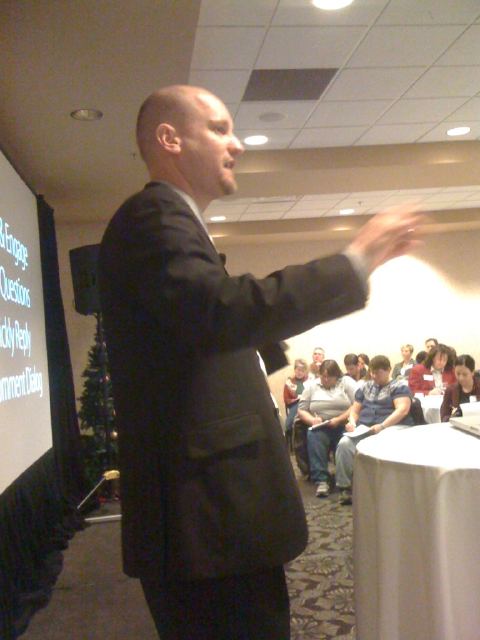
Here are Alan’s 7 steps:

1. Develop a social media policy.

2. Educate your Employees.

3. Define your purpose. Alan says there are only 5 basic things businesses can do using social media

– Branding. YouTube is a great vehicle for this, as this Sienna music video demonstrates

– E-commerce

– Research

– Customer retention/service

– Lead generation

4. Understand timing. The “life” of a tweet is about 8 minutes, so you should post updates on Twitter or Facebook at 11 a.m., 3 p.m. and 8 p.m., which are the times when people are active and likely too see your message. The top of the hour also has the most interaction.

5. Create Facebook page.

– Understand the difference between a Page and a Profile. Profiles are for individuals. Pages are for businesses or organizations. Don’t try to make a business presence on a profile. It needs to be a page. Using a profile violates the Facebook terms of service.

– Get creative. Use a large picture. You are limited to width of your picture, but not the height. Design a long, tall graphic.

– Create a custom landing page using FBML. Get the FBML app in Facebook so you can customize, instead of having people just “dumped onto your wall.”

– Adjust permissions to have the default landing page be your custom landing page.

6. Set up processes. Decide who in your company does what, when, where and how. Somebody needs to be responsible.

7. Monitor & Engage. Ask questions. Respond.

How to get more fans?

– Give away something. Set up a contest saying you’ll give away an iPod to a fan once you get to 1000 fans.

– Tag fans in photos.

– Embed widgets or icons on your Website or e-newsletters. Ask people to “join the conversation.”

– Store displays.

– Add it to email signature line. Encourage employees to do likewise.

– Use the @tag. In your status updates, create a link to your page with the @ tag. Use it sparingly. More on this in a future post.

– Use “Apps.” Survey apps, poll apps, promotion apps get people involved in your page. Many have viral components.

– Use “Deals.” This is what users are most interested in getting from you. Individual, Loyalty, Friend or Charity deals, based on what works for you. When people “check in” at your business with their smart phones. When people check in at your business it goes on their wall that they just got a deal at your business. You need to start by claiming your place. Check in at your business using your smart phone. Go to your wall on your computer and execute the claim. You need to show proof, but then that lets you use Deals.

– Merge your Place with your Page. More on that later.

Dealing with four kinds of negative feedback:

Straight problems – Legitimate issues. Always respond.

Constructive Criticism – Suggestions for ways to improve. Thank the person for the ideas.

Merited Attack – Always respond. Don’t take them personally, but acknowledge.

Trolling/Spam – Do not respond. Delete.

Now we’re looking forward to a good discussion with the panel.
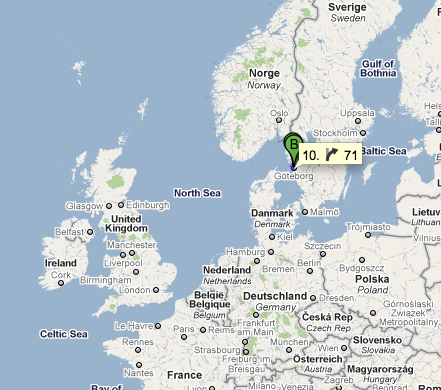
SMUG goes to Sweden

I’m at the airport in Rochester right now, getting ready to fly to Minneapolis, then to Amsterdam and finally to Gothenburg, Sweden. On Thursday I will be presenting at a symposium of the Swedish Society of Medicine, and also participating in a social media panel.

I’ll be heading back home Friday, in time for my middle son’s first varsity basketball game, which is Saturday afternoon. So it’s a short trip, but should be an interesting experience.

November 2010 has been my lightest-posting month in more than three years. I’ve got some good reasons for that, as will become apparent in the near future. Meanwhile, I’ll be making up for it by posting and tweeting about my Swedish experience, as I continue to put the “G” in SMUG.

More to come…

American Medical News highlights hospital social media

American Medical News has a nice profile this morning of Dana Lewis, who exemplifies the new role, in an article titled “Hospitals’ new specialist: Social media manager.” The article begins:

For otolaryngologist Douglas Backous, MD, Twitter and blogging were “like speaking a foreign language.” So he went to his hospital and got himself a translator: Dana Lewis, hired by Seattle’s Swedish Medical Center to handle all things social media.

Lewis is part of a trend in a new and growing type of hospital employment: the social media manager.

Technically, she’s called the interactive marketing specialist. But she, and others like her, are being charged by their hospitals to handle such duties as overseeing their social media presence, communicating with patients through social media — and, in many cases, teaching affiliated or employed physicians how to use social media. The idea is that by having a person dedicated to social media, the hospital can use the technology to strengthen its connections with all of what organizations like to call their stakeholders, which include the physicians who refer patients through their doors.

Check out the whole article: Ed Bennett’s Hospital Social Networking List also is featured, as are my 35 Theses here on SMUG. It also has a nice compilation of social media best practices for hospitals, which author Bob Cook apparently synthesized from several guidelines documents.

Here’s more information on what we’re doing at Mayo Clinic, with our new Center for Social Media. I’m excited that we’ve hired candidates for four of the eight new positions with the Center, and that we have interviews this week and next for two more. I’m also honored that both Ed and Dana are on our advisory board (with 12 more members still to be named). We’re going through about 120 applications from some really strong candidates to ensure broad-based and diverse membership.

When the official online publication of the American Medical Association devotes an extensive article to the topic of social media staffing for hospitals, that’s a good sign the activity is going mainstream. We’re glad to contributing to that through the Mayo Clinic Center for Social Media and the Social Media Health Network.

Safe Social Media for Family, Fun and Profit

Tonight I’m giving the first of three presentations I will be doing for a group of community banks in southern Minnesota over the next three Thursdays.

Here are the slides I will be using. Some will be familiar to those who have seen my previous presentations, but there is a new section on Facebook privacy protection that begins at about Slide #92.

Many of my presentations are for medical audiences, so it’s nice for a change of pace to be talking with parents and business owners.

Facebook 211: Friend Lists

In Facebook 210, a course developed over two years ago, I described how to use friend lists to make Facebook your all-purpose networking platform.

Back then, Facebook had “only” 100 million active users. Now it’s over 500 million. And over the last couple of years there have been changes to the site and resulting controversies about privacy. I will deal further with privacy protections in Facebook 212 and 213, but for now I want to update the Friend lists concept and highlight the role it can play, enabling you to be friends on Facebook with a wide variety of people without giving all of them the same level of access to your information.

Continue reading “Facebook 211: Friend Lists”