Page Society Conference Live blog

I just discovered that Walter Jennings had liveblogged the Arthur W. Page Society Annual Conference. So here’s where you can go for one blogger’s as-it-happened account of one of the best conferences I’ve ever attended.

page society conference
Mr. Jennings, a former communications chief for Ford Credit, must be a typing maniac. He’s moved to Australia, so I’m thinking he has a bit of the Tasmanian Devil in him, at least around a keyboard.

He blogged a lot about the conference, everything from Miles White’s opening keynote to the Globalization panel featuring Dr. Kenneth Lieberthal, his comments about China’s water problems and his advice to China; Geoff Davis of Unitus on micro-finance, Debjani Deb on outsourcing, Beth Comstock’s Peacock-eye view of the New Media Landscape from NBC Universal, comments from Phil Rosenthal (the Chicago Tribune’s media critic), from Mitch Gelman of CNN.com and from Sue Gardner, from the foundation that supports Wikipedia.

Monday night’s dinner at Mission San Juan Capistrano was great, and Mr. Jennings captured the essence of Tina Brown’s keynote. He also covered our panel on social networking, including extended posts on my fellow panelists Jeff Berman from MySpace and Adam Brown from Coca-Cola. Here’s his post on the NGO panel, and on Michael Hyter’s presentation on generational differences.

If you attended the Page Society conference, these posts will help refresh your memories of the various sessions, and if you didn’t attend, they’ll give you a taste of this first-rate and highly stimulating event.

TechnoratiTechnorati: , , , , , , , , , , , ,

12-Step Social Media Program for PR Pros

NOTE: With the founding of Social Media University, Global (SMUG), this post has been incorporated into the curriculum as Social Media 101. Click the link above to learn more.

The Arthur W. Page Society annual conference this week was certainly eye-opening for me. I wrote here about how much I was anticipating this conference, and if anything it exceeded my expectations.

The feedback on our social media panel was positive, too, and it’s been great having several of the Page members “friend” me in Facebook and also join the Page Society group.

One thing I said during our panel was that

for communications professionals, being unfamiliar with social media tools borders on malpractice.

Think about it: Technorati tracks about 100 million non-spam blogs, and MySpace has more than 100 million active users. That’s also roughly the number of video streams served by YouTube each day. And Facebook, with 41 million members, has added a million a week, every week this year. This is mainstream activity in our society for ordinary people; we who communicate for a living on behalf of our organizations certainly need to understand the implications of these media. Far from “costing our employers dear” by involvement in Facebook, we actually cost them much more if we don’t know about all of the new means of communicating; not just “getting our message out” but actually engaging in conversations with customers, suppliers and employees.

Please note that you can take every one of these steps without spending a dime and without involving your IT department. Procrastination is your chief enemy. Take one step each day (starting by reading the rest of this post as step 1), and within two weeks you will have a good preliminary familiarity with social media. Then you’ll be able to start thinking creatively about how social media can be used on behalf of your company or clients. And you’ll be aware of how those with agendas contrary to your organization’s may be using social media.

So, with apologies to 12-step programs in which people have banded together to battle addictions, here is my 12-step social media program public relations professionals can join.

  1. Admit that you have a problem. See above. Unfamiliarity with social media is a serious gap for PR professionals.
  2. Browse some blogs, both to get a feel for the blog culture and to learn how blogs work. This backgrounder in Wikipedia will be helpful. As for blogs you should explore, any of those listed in my blogroll (at right) are good places to start.
  3. Check out TheNewPR/Wiki. This is a great resource for white papers, lists of CEO blogs, sample corporate blogging policies, blog directories, business podcast listings, and much more.
  4. Go watch three “Plain English” videos: RSS in Plain English, Wikis in Plain English and Social Networking in Plain English. These will be among the best few minutes you’ll invest in your social media education.
  5. Get an RSS reader/aggregator. If you use Safari for Macintosh or Internet Explorer 7 for Windows, you have an RSS reader built into your browser already. Google Reader is a great free online RSS aggregator. If you have a laptop and would like to be able to read your feeds when you’re not connected to the Net (like when you’re on the bus), you might want to get a standalone reader like NetNewswire (Mac) or NewsGator (Windows), or one of the Attensa products (they’re free).
  6. Subscribe to some blogs. You can subscribe to mine here, or as you are checking out others, look for the RSS or XML links, or for the universal feed logo.
  7. Get a free Gmail or Yahoo! email account. You’re about to start actively engaging in social media as you follow the next steps in the AAse program, and using a non-work email for blogging and commenting is a good practice.
  8. Over 90 percent of blog readers are “lurkers” and aren’t contributing to the conversation. That’s fine, but your next step is to comment in some blogs. If you find the information on a blog post helpful, say so in the comments. If you don’t understand something or have questions, ask them in the comments.
  9. Get a Facebook account and a MySpace profile. I’ve devoted a whole section of this blog to business-related uses for Facebook. I expect I will be writing a bunch more in the future. If you subscribe to my blog by RSS you’ll get these sent directly to your reader automatically. Or if you follow me on Twitter (see below) you’ll get more cryptic alerts. If you friend me, you’ll see some of the Facebook groups I’ve joined, or if you join my Professional Contacts group we can have conversations about social media within Facebook, and I can use that group to send special alerts to you through the Message All Members function. Once you’re in Facebook, spend some time exploring applications. Find high school and college classmates. Upload some photos and videos, and tag yourself and some friends in them. Then watch your News Feed and your mini-feed, and begin to see some of the networking power. I much prefer Facebook over MySpace, but I still need to spend some time with MySpace because so many other people do. It’s too big to ignore. And especially if you work for a company that needs to reach a younger demographic, it’s too big for you to ignore, too. Explore a variety of social networking sites like this so you understand their similarities and differences.
  10. As Sylvester’s prey would say, “Twy Twitter.” Twitter is a micro-blogging tool that lets you follow the actions of others and lets them follow you. Posts are limited to 140 characters. You can get alerts on your cell phone by text message, through your Twitter home page, or both. And you can send “Tweets” by cell phone, too. Here’s my Twitter account. As I’ve said previously, Twitter could be a great way to activate a crisis communications group.
  11. Share videos and photos with the broader world. YouTube and Flickr are the market leaders in these areas. In Facebook you can share photos and video with just your friends. YouTube and Flickr make it possible for anyone to access and share these digital resources.
  12. Get your own blog. WordPress.com is free. So is Blogger. I prefer the former, and use it for this blog. One of the main benefits of WordPress is the Akismet spam protection; I’ve been protected from more than 18,000 spam comments in the last year. You can incorporate your YouTube videos (as well as others you find interesting) in your blog, and likewise can embed photos, like this one of my family at my in-laws’ 50th anniversary:

12-step social media program

And in WordPress.com you can make your blog private if you want, and not available for search engines or even visible without your permission. So you can experiment without worrying about other people seeing your blog, if you just want to explore.

But if you follow step 12 and create a public blog you will be doing the social media equivalent of the 12th step of Alcoholics Anonymous:

Having had a spiritual awakening as the result of these steps, we tried to carry this message to alcoholics, and to practice these principles in all our affairs.

I’m not promising spiritual awakening as a result of getting involved in social media, although here’s a blog with spiritual awakening potential. But as you learn about social media and its implications for PR and corporate communications, engagement in the discussion through your blog, or by inviting your co-workers to join social networking sites like Facebook, is a way to”carry this message” about social media to other professional communicators. As the cutesy cliché puts it, this is how you can “pay it forward.”
Members of addiction-fighting 12-step programs find it necessary to meet regularly to support, encourage and challenge each other to stay sober. By following the 12 steps of the AAse Social Media Program for PR Pros you will have this built-in support network for continued learning and growth.

But you may find you need a new kind of 12-step group to help with your Facebook addiction.

Add to FacebookAdd to DiggAdd to Del.icio.usAdd to StumbleuponAdd to RedditAdd to BlinklistAdd to Ma.gnoliaAdd to TechnoratiAdd to FurlAdd to Newsvine

TechnoratiTechnorati: , , , , , , , , , , , , , , , , ,

LA Travel Tip: Los Angeles Athletic Club

Los Angeles Athletic Club

Here’s a travel tip for next time you’re in LA: stay at the Los Angeles Athletic Club.

After the Arthur W. Page conference last week I stayed an extra day in Los Angeles to visit with some health journalists in the nation’s #2 market. I ran across an extremely pleasant surprise in my accommodations for Tuesday night, in the Los Angeles Athletic Club. I would highly recommend it to anyone traveling to Los Angeles for business.

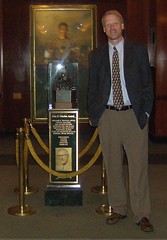
My first surprise was in the lobby, where behind the velvet ropes I saw the John R. Wooden Award, which is given each year to the nation’s top college basketball player. I couldn’t resist having my picture taken next to it.

travel tip los angeles athletic club

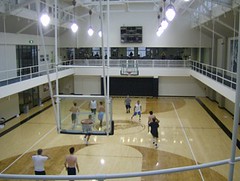
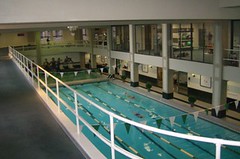
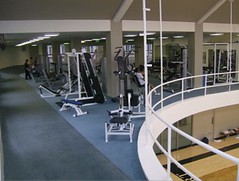
Then I found out about all of the exercise facilities, including the basketball court (at top), the swimming pool for lap swimming, the running track and the weight training facilities. These pictures don’t do them justice:

travel tip los angeles athletic club

The room was an even nicer surprise: wireless internet was free (instead of the $9.95 a night so many hotels charge because they know it’s a must-have for business travelers.) There was a complimentary fruit basket (the apple from which I am eating as I write this) and also a free breakfast buffet. The toiletry basket in the room included not only the customary shampoo, conditioner and lotion, but also toothpaste (especially welcome given TSAs anxiety over gels and liquids in carry-on luggage), toothpaste, a razor and shaving cream. And parking was just $8.80 a night, with in/out privileges.

The nightly rate was quite reasonable, and the staff was courteous and professional (even taking the picture of me with the Wooden Award).

Next time you’re staying overnight in Los Angeles, give the LAAC a try.

TechnoratiTechnorati: , , , , , , ,

Peninsula to Favor Telecommuting?

Facebook ban commuting

I just returned from a few days in California, including the last day or so in Los Angeles. While I was there, the Texas Transportation Insitute issued its annual study of traffic congestion, which led to this story in the Los Angeles Times:

The Texas report says motorists in Los Angeles and Orange counties spent an average of 72 extra hours in rush-hour traffic in 2005, the subject of the current study. That’s one day shy of two full workweeks a year and is 20 hours more than in 1985. The delay represents the difference between how long it takes to travel during peak periods compared with hours when traffic flows freely.

Unlike last week’s bogus “study” that alleged Facebook was costing British firms “dear,” this traffic study is being criticized for underestimating the actual time lost in traffic.

(Note: Despite requesting a copy of the study from Peninsula, I still haven’t received it. And Dennis Howlett has a great analysis of the ludicrous math behind Peninsula’s headline-chasing. Where are the professional journalists when you need them? Why do they uncritically repeat these allegations without doing a quick calculation, as Dennis did, of whether such a figure is even possible, to say nothing of its plausibility? Thanks to Neville Hobson for pointing out Dennis’ post on his For Immediate Release podcast with Shel Holtz. And Shel read this humorous take on the issue, how employers are infringing on employees’ free time.)

In the reporting on the traffic study, by contrast, the LA Times does something novel: it reports the assumptions behind the study findings and quotes someone who challenges them.

The study “does a great disservice to the state and the region,” said Hasan Ikhrata, the organization’s director of planning and policy. “I would not make policy decisions based on their data, period.”

Ikhrata contends that the new method used by the institute mistakenly assumes that traffic in Los Angeles County, Orange County, the Inland Empire and Oxnard-Ventura is moving much faster during rush hours than it actually is.

Texas researchers assumed that traffic is traveling at an average of 35 mph during peak travel times. However, SCAG planners say that sensors buried in the pavement of major freeways in the Los Angeles area show that the average speed during rush hours is closer to 20 mph. By this measurement, Ikhrata said the extra delay is roughly 100 hours per year, nearly 40% worse than the Texas estimate.

Ikhrata said the actual data, collected from the sensors by the state Department of Transportation, indicate that all of the Los Angeles region’s major freeways have segments moving at less than 10 mph during the most heavily traveled part of the long morning and evening peak periods.

Having just been in LA and the OC, I’m with Hasan on this one. Going from downtown LA to Angels Stadium in Anaheim took about 80 minutes, or a full hour longer than if traffic had been moving.

I wonder whether the next headline from Peninsula will be a call for firms to initiate telecommuting policies to reclaim lost productivity. Might we a good way for this UK-based firm to expand into the US market.

TechnoratiTechnorati: , , , , , , , , ,

Facebook Tip: Don’t Be Just a Number

One of Facebook‘s limits is that with more than 40 million users, and a million added each week, it’s sometimes hard to find a person searching just by name.

Facebook tip don't be just a number
For example, last night I met Adam Brown from Coca Cola (with whom I am participating as part of a panel today at the Arthur W. Page Society conference.) I went back to my room and wanted to “friend” him, but when I did the search by name for “Adam Brown” I got this result:

Name number facebook

I don’t know exactly how many Adam Browns Facebook has, but it’s more than 500. Finding him would be an arduous process if I had to click through, screen-by-screen, viewing a handful at a time. Fortunately I was able to use the search within other networks function to narrow it to the Coca Cola network and send him the invitation. (By the way, the Coca Cola network has 915 members.)

Then last night I got a friend invitation from Mari Smith, and after I had accepted I saw that she had added an application called Profile Web Address, which lets you create a more memorable URL so people can find you on Facebook.

Which is more memorable? This:

http://www.facebook.com/profile.php?id=777087888

or this:

http://profile.to/leeaase

To ask is to answer, isn’t it?

This application isn’t that essential for someone like me because my name is unique enough. When you Google Lee Aase, you get my blog as the first result. When you search for Lee Aase in Facebook, you get four results (one of which is my Professional Contacts group.)

But the reason I added this application anyway is so someone else doesn’t take my name, so I would encourage everyone in Facebook to add this application and stake your claim. It would be great if profile.to would create a similar application for groups, too. That would enable organizations to create official groups within Facebook and not have them lost in less relevant results that may also use the organization’s name.

If you have a common name like the Browns and Smiths listed above, and if you have a Yahoo or Gmail account, you might want to use that as your Profile Web Address. That way, when you’re meeting people and they want to know how to connect with you, you could tell them, “I’m joesmith23@gmail.com or profile.to/joesmith23.”

When Facebook profiles become available in Google (which should be in a couple of weeks), it may make this tool less relevant. I may be able to search for “Adam Brown Coca Cola” and have his profile show up on top. But for now, I think this is a worthwhile application.

And this is why I typically accept friend requests from people who read my blog, because by seeing what they are doing and the applications they’re adding, I learn things I can apply myself. And I’m still about 4,900 behind Scoble.

For tips and background on using Facebook in business or in your non-profit or not-for-profit organization, click here or the Facebook Business tab above.

TechnoratiTechnorati: , , , , , , ,