Behold The Power of Twitter

At noon today, I had an opportunity to conduct a Twitter training class for physicians from one of our clinical departments at Mayo Clinic.

I wanted to show them the reach and speed of Twitter, and how it can spread messages widely and quickly. So, at 12:28, I put out this tweet to my Twitter followers:

Within seconds, the responses started coming in:

Update: I went back to Tweetdeck to capture the actual times of the tweets. I think it makes the speed of the spread even more interesting. It also shows the half-life of a tweet.

The tweets above all arrived in the first hour. Since then, a few more trickled in…

Altogether, that’s 57 replies or retweets from 21 states, the District of Columbia and Canada.

The total potential reach of the message- to my followers plus the followers of those who tweeted – was 66,986. Of course not everyone among those followers saw the message. If they didn’t happen to be watching Twitter at the time, they missed it.

Still, I think that’s pretty amazing for a lunchtime experiment.

Thanks to everyone who participated by replying or retweeting!
Facebook 240: 5 Steps to Customizing Your Facebook Page

In my post last Friday from the Facebook for Business seminar, I reported some recommendations from Alan De Keyrel, a friend from Rochester who was the keynote speaker.

Among Alan’s suggestions was that organizations with Facebook pages should create a custom landing tab for their visitors, so that you don’t “just dump them on your wall” but instead have some kind of welcome message that directs them in a way that is in keeping with the goals you have set for your Facebook page.

In Facebook 240, I will take you step-by-step through the process of customizing your organization’s page.

In keeping with my original goals for SMUG, to learn on my own before applying in my work, I will use the SMUG.Chancellor page as the demo example.

Maybe soon we will apply something like this on our Mayo Clinic page. In the meantime, I’ve learned the basics of how to do this, so if and when we decide to make that switch we can do it seamlessly.

Note: The following applies to organizational or business Pages, not personal Profiles. The SMUG.Chancellor page is what was formerly called a “fan” page, and even though it says “Lee Aase” at the top, it’s about me as an author/speaker. It’s different from my personal profile.

A personal Profile uses the “Add as Friend” terminology, and is for individuals to connect with each other. It is reciprocal; in other words, you don’t get to see my profile details until you add me as a friend and I confirm the relationship. Pages, on the other hand, use the “like” lingo. If you “like” Lee Aase, the SMUG Chancellor, you are connected to that page. No need to confirm the connection.

So I’m glad to be your friend on Facebook, but I hope you’ll like me too.

Step 1: Install the FBML application on your page

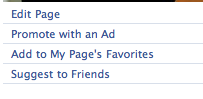
From your Page, click the Edit Page link under your profile picture:

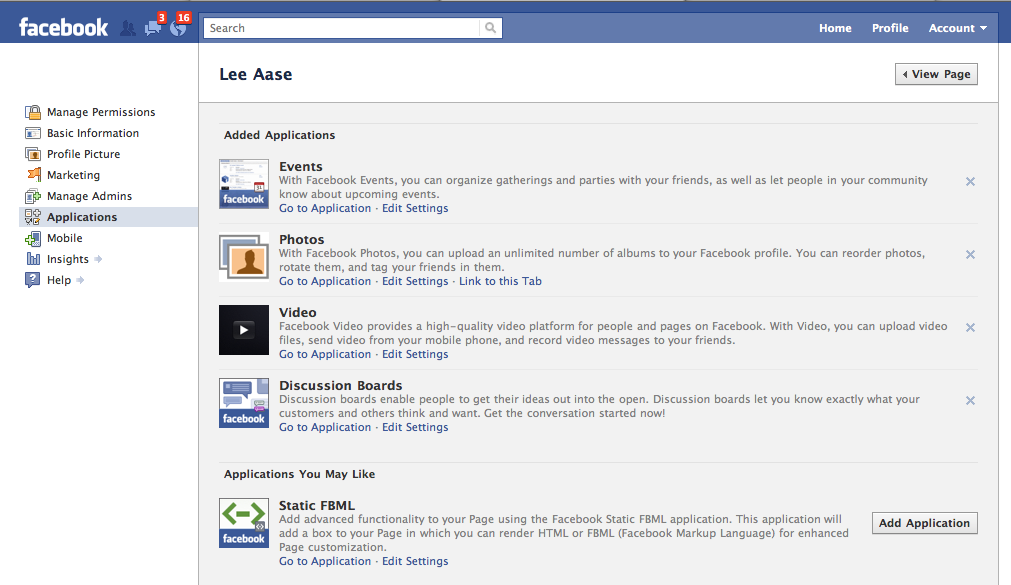
Then click the Applications link in the left navigation to see the applications you have already installed. Your screen should look something like this (click to enlarge):

Click on the Add Application button for the Static FBML application. If for some reason the Static FBML application isn’t listed, you can search for it by clicking the Browse more applications link at the bottom of the list.

Continue reading “Facebook 240: 5 Steps to Customizing Your Facebook Page”

7 Steps to Using Social Media in Business

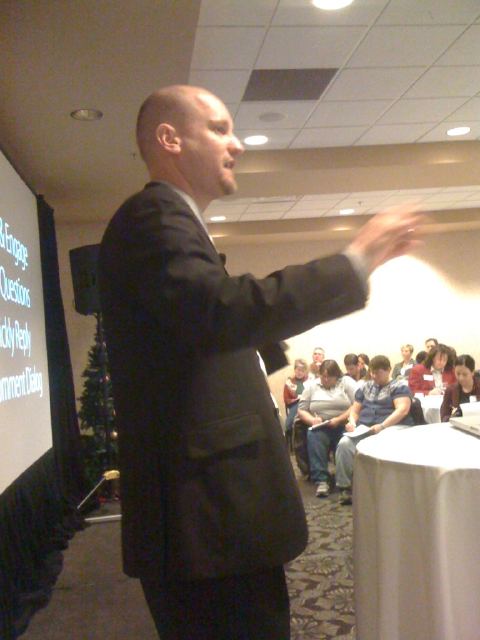
Today I am participating in a Rochester MN Chamber of Commerce event called Facebook for Business. I did a 15-minute intro/overview, and Alan De Keyrel of CWS, Inc. is delivering the keynote, called “7 Steps to Using Social Media in Business.”

Here are Alan’s 7 steps:

1. Develop a social media policy.

2. Educate your Employees.

3. Define your purpose. Alan says there are only 5 basic things businesses can do using social media

– Branding. YouTube is a great vehicle for this, as this Sienna music video demonstrates

– E-commerce

– Research

– Customer retention/service

– Lead generation

4. Understand timing. The “life” of a tweet is about 8 minutes, so you should post updates on Twitter or Facebook at 11 a.m., 3 p.m. and 8 p.m., which are the times when people are active and likely too see your message. The top of the hour also has the most interaction.

5. Create Facebook page.

– Understand the difference between a Page and a Profile. Profiles are for individuals. Pages are for businesses or organizations. Don’t try to make a business presence on a profile. It needs to be a page. Using a profile violates the Facebook terms of service.

– Get creative. Use a large picture. You are limited to width of your picture, but not the height. Design a long, tall graphic.

– Create a custom landing page using FBML. Get the FBML app in Facebook so you can customize, instead of having people just “dumped onto your wall.”

– Adjust permissions to have the default landing page be your custom landing page.

6. Set up processes. Decide who in your company does what, when, where and how. Somebody needs to be responsible.

7. Monitor & Engage. Ask questions. Respond.

How to get more fans?

– Give away something. Set up a contest saying you’ll give away an iPod to a fan once you get to 1000 fans.

– Tag fans in photos.

– Embed widgets or icons on your Website or e-newsletters. Ask people to “join the conversation.”

– Store displays.

– Add it to email signature line. Encourage employees to do likewise.

– Use the @tag. In your status updates, create a link to your page with the @ tag. Use it sparingly. More on this in a future post.

– Use “Apps.” Survey apps, poll apps, promotion apps get people involved in your page. Many have viral components.

– Use “Deals.” This is what users are most interested in getting from you. Individual, Loyalty, Friend or Charity deals, based on what works for you. When people “check in” at your business with their smart phones. When people check in at your business it goes on their wall that they just got a deal at your business. You need to start by claiming your place. Check in at your business using your smart phone. Go to your wall on your computer and execute the claim. You need to show proof, but then that lets you use Deals.

– Merge your Place with your Page. More on that later.

Dealing with four kinds of negative feedback:

Straight problems – Legitimate issues. Always respond.

Constructive Criticism – Suggestions for ways to improve. Thank the person for the ideas.

Merited Attack – Always respond. Don’t take them personally, but acknowledge.

Trolling/Spam – Do not respond. Delete.

Now we’re looking forward to a good discussion with the panel.

Going Viral against HIV and STIs

I’m delighted this morning to be joining my friend Susannah Fox and many others at this one-day conference sponsored by the New York State Department of Health, and hopefully helping to encourage many of the participants to apply social media in their work. I will be sharing our Mayo Clinic experience with social media and also discussing our new Center for Social Media and the Social Media Health Network.

Because I will be moving really rapidly through the presentation, I’m embedding the slides below:

If Snow Blowers were like Hard Drives…

…I would have been able to get this one for about 23 cents.

As it was, I picked it up at Sears on Black Friday for $419, or about 40 percent off.

That 23 cents figure is just a guess, and is probably way high, in the snow blower/hard drive comparison of prices and capabilities over time. My dad bought his first snow blower about 40 years ago, and I think he paid about $500. In today’s dollars, that would be about $2,800. Even though my snow blower today isn’t as heavy duty as Dad’s was, getting it for about 13 percent of the price, in constant dollars, is pretty good.

That is, until you compare it to electronics, and particularly my favorite example, hard drives.

Last year I wrote about my brother-in-law, Lane’s, experience in buying what seemed then a massive hard drive in the mid-80s, and how I had bought a hard drive that had 200,000 times more capacity (1 terabyte or 1000 gigabytes) for $70 at a Black Friday sale. I also suggested that smart SMUGgles should mark their calendars for 11/26/10. I predicted that they would be able to buy a 1.5 terabyte hard drive for about $70.

I was wrong.

It was even better: Target had a 2 TB desktop drive (400,000 times what Lane bought) for $69, and a portable 1 TB drive for the same price. I just took a photo instead of buying a drive, because I have about 500 gigs of free space on my drive from last year. I applied that $69 toward the snow blower, a more pressing need.

I think I’ll wait until 11/25/11 to get another hard drive, when I should be able to get 3 TB (or more) for $70.

Anyone want to join me?