I ran across an excellent overview of Twitter yesterday, via Mashable. Jessica Hische does a great job outlining who sees what when you post to Twitter, reply, retweet or use #hashtags, and also highlights some important differences between Facebook and Twitter.
As Jessica indicates, her guide isn’t just for moms, because the misunderstandings about Twitter span the generations. In fact, younger people (high school and college) are among those most likely to not “get” Twitter. They already have SMS texting, and Facebook chat, so they think their needs for the kind of communication Twitter provides are already met.
Maybe Jessica’s overview will help them see the value.
If I didn’t already have all of the low course numbers taken in the SMUG Twitter Curriculum, I probably would have made this one of the introductory courses, like Twitter 105.
So instead, I’m giving it a course number that is a particular honor in the Twitterverse:
It’s 6:30 on Christmas Eve morning as I begin writing this. Why am up early on my first of five days off from work? Because my youngest daughter, Ruthie, needed to get to her nursing assistant job at 7, and we had to get a car free from six inches of new-fallen snow. Part of the record cumulative snowfall for December here in southern Minnesota, and further evidence for global warming.
So, as I sip coffee and wait for the snowfall to taper off so I can fire up my newly acquired snowblower (good year to get it, huh?), it’s time to reflect on – and give thanks for – the events of 2010.
…why would you not get a Facebook page for your business or organization?
Here are four reasons why a Facebook page is better than a Yellow pages ad, and why it’s not even a close call.
A Yellow Pages ad is expensive. A Facebook page is free.
A Yellow Pages ad typically has a distinctive cast that suggests jaundice. Color is even more expensive. Your organization’s logo (or other photo) goes on your Facebook page in full-color for free.
A Yellow Pages ad is limited to text and maybe a photo or two. A Facebook page can have unlimited photos, not to mention videos. (Well, I guess I did just mention videos.)
A Yellow Pages ad reaches a limited geographic market. Anyone in the world can see your Facebook page, except for citizens of repressive political regimes or employees or corporate regimes with a blocking philosophy.
I could go on, talking about how on Facebook your best customers can interact with you and share the love with their friends, while a Yellow pages ad is static. And how the paper directories can get lost on a snowy doorstep (at least here in the frozen tundra.)
I’m certain those with a proprietary interest in Yellow Pages (or Yellow Book, or whatever post Ma Bell-breakup variety you have in your area) would be quick to point out how they also have online directories as part of their package.
But that misses the point. The yellows used to have monopolies when people were looking for a particular category of service. It was expensive to produce a paper directory and deliver to every household in an area.
Now with Yelp and Angie’s List and countless other similar sites, it’s easy for potential customers to get information (including contact phone numbers) for local service providers.
And don’t forget local search in Google.
My point is not to run down the yellow directories, or to say you shouldn’t use them. That’s a call you have to make. Maybe they work for you, and should be part of your mix. If their publishers are doing their jobs well, they should be continually adding features to improve their value proposition.
But if you’re spending substantially for Yellow Pages, why wouldn’t you use the free option, too?
Those who have used Twitter are familiar with the @ lingo: When you put @username (e.g. @LeeAase, @MayoClinic, @MeredithGould) in a tweet, you are replying to or mentioning that Twitter user in the public space.
Facebook developed similar functionality several months ago, but I have to confess I haven’t used it as much or as well as I should.
Hearing my friend Alan De Keyrel mention the @ tag in Facebook as a key strategy for building connections caused me to take a more in-depth look. I think it’s definitely something people in charge of maintaining Facebook pages for an organization should be exploring and using.
As with all powerful tools, it can go terribly wrong if abused. So in this course I’m going to give the overview of
how the @ tag works,
some ways it could be used productively, and also
some cautions on what to avoid.
How it works:
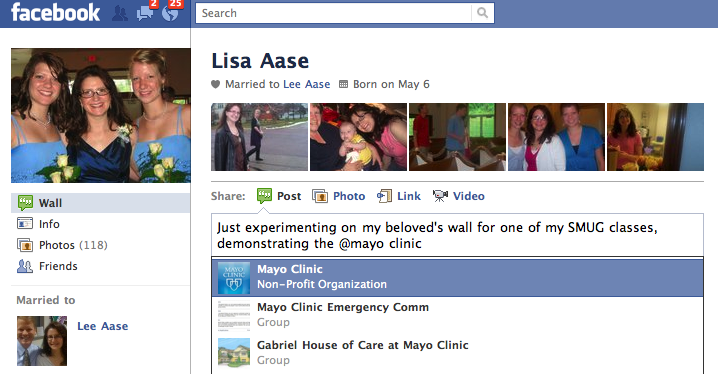
When you are posting a link or a status update to your wall in Facebook, you can create a link to any of your friends’ Profiles, Pages you like or groups to which you belong, by typing @ in your update and waiting for a list of relevant pages or friends or groups to appear. It will look something like this:
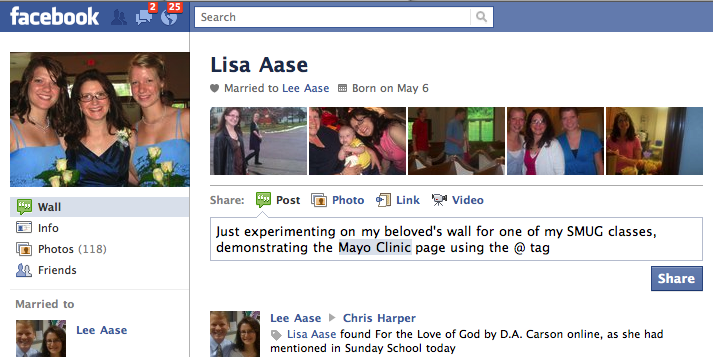
When you hit your enter key to select the relevant page, profile or group, the update will look like this, just before you post it:
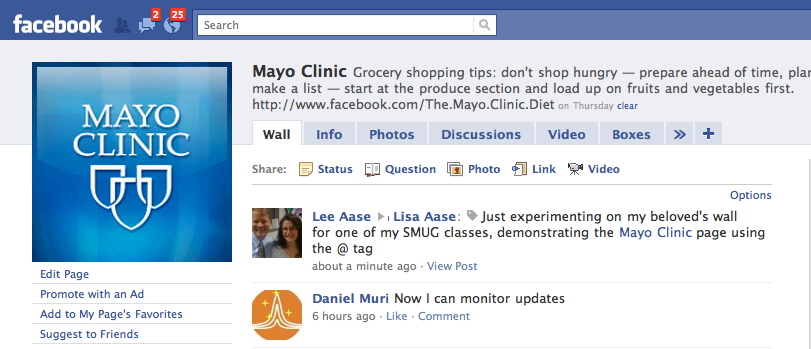
The cool thing is that this shows up not only where you posted it directly, but also on the linked pages. Here’s how it appeared briefly on the Mayo Clinic page (before I quickly removed it):
And here’s what it looked like on my wife Lisa’s wall:
How the @ tag can be used productively:
The @ tag is essentially like tagging an individual in a photo, but it goes beyond that. It’s a great way to share content with your friends and with their friends.
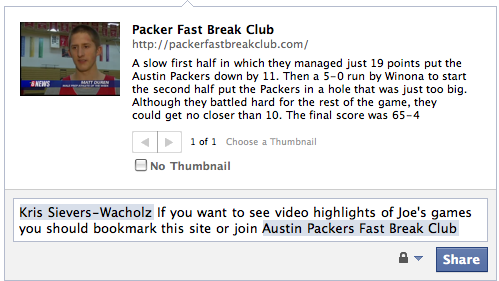
So, for example, I just posted a link to the Austin Packers Fast Break Club site (a blog we use to share highlights from my son’s high school basketball team) to my sister-in-law’s Facebook profile using the @ tag:
As you can see, this can be a really powerful way of spreading information on Facebook. But as Uncle Owen told Peter Parker, “With great power comes great responsibility.” This leads us to the third point:
Cautions on what to avoid in using the @ tag
Mainly, don’t think like an advertiser. Advertisers look for ways to interrupt people and push their messages, whether the recipient wants them or not.
In my first example above, I did post something to Lisa’s wall that may not have been all that interesting to her, although I did refer to her as my beloved. She understands when I need to experiment. Part of the price of being married to the Chancellor.
In the second post, though, I was sharing something with my sister-in-law about her nephew’s basketball team. I had every reason to expect she would find it interesting and welcome.
The side benefit is that some of her friends, such as other family members, will see this on her wall and may also like it. They may also decide to join the Facebook group or subscribe to the blog.
If I just started randomly tagging other friends in the post, that would have been a quick way to lose friends and not influence people.
The same is true for your use of @ tags relating to your organization’s page. It’s one thing if your friends or page connections decide to tag your page on their profiles, or tag their friends in a post or status update. It’s completely different when you use the @ tag to spam pages or profiles.
It all comes down to not being “that guy”
Think like a real person. If you’re using the @ tag mainly to drive traffic and not to connect people to information that will be interesting to them, your effort will not be successful in the long run.
But used wisely and with integrity, the @ tag can play a significant role in helping you make connections with people who share your concerns and convictions.
A week ago today I participated in a Rochester Chamber of Commerce seminar on Facebook for Business. I led off the discussion and then took lots of notes from Alan De Keyrel’s keynote presentation, which I summarized in this post.
Now Alan’s company has posted the video from the event so you can see it for yourself. Since it’s on Vimeo, I’ve embedded it below: