Twitter 130: Listening with Twitter

In Twitter 107, I compared two desktop applications for improving your Twitter interactions: Tweetdeck and Twhirl.

In this course, I will take you through a case study of what can happen when you listen and engage through Twitter.

Several months ago, I set up a Twitter search for the term “mayo clinic” and subscribed to the RSS feed. And frankly, for quite a while the feed wasn’t all that interesting. Mayo Clinic wasn’t mentioned very often on Twitter, probably because Twitter’s earliest adopters skewed younger and male, at least as compared to the typical health care consumer or decision maker.

That’s recently changed quite a bit, though, especially as Twitter has reportedly grown by 33 percent in the last month. While the Tweet volume is still nowhere near what Comcast experiences, for example, we’re at least seeing a dozen or more Mayo Clinic tweets a day. 

So as I set up my Tweetdeck to be more intentional and regular in listening on Twitter, I created one pane to monitor the “Mayo Clinic” search. (I had previously used the Twilert service, which sends you a daily email with the tweets that match your search criteria, but wanted to be more responsive than a daily email digest would allow.)

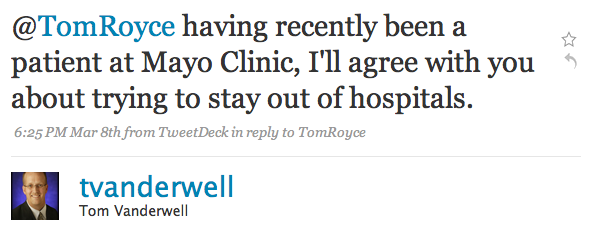
I was somewhat surprised last Sunday night to see the following Tweet from a gentleman named Tom Vanderwell, who goes by @tvanderwell on Twitter:
toms-first-mayo-tweet

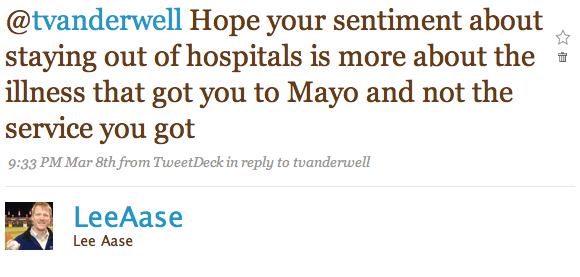
I wasn’t sure what to make of this. Was that a negative comment or a positive one? So I replied to Tom’s Tweet with:
leetotom1

Much to my relief, Tom’s response was:

tom2lee1

After clicking through to Tom’s Twitter profile, I found out he was from Grand Rapids, Michigan. As we exchanged replies and eventually direct messages, I mentioned that I was going to be at a conference in Grand Rapids this Wednesday. It turns out the convention was right across the street from his office, so we arranged for a real-life meeting Wednesday morning (a picture from which I posted, of course, using Twitpic).

Share photos on twitter with Twitpic

In a future post I will profile Tom and how he’s using social media in his mortgage banker business, particularly with his Straight Talk about Mortgages and Real Estate blog. But for now, let me just say that we had a delightful conversation and were able to connect in a way that wouldn’t have been possible without Twitter. 

What’s your favorite example of a Tweetup? When have you been able to meet someone in real life, either a brand-new friend you made through social media, or someone you’ve known virtually for a while but only later got to meet face to face?

Facebook Pages Get a Major Upgrade

Facebook’s Pages program for businesses and other organizations got a major upgrade this afternoon with the implementation of changes that make pages much more like a personal profile. In fact, I think they are now calling pages “Public Profiles.” And I have added emphasis below to Facebook’s description of what I think is the most important new benefit:

By leveraging the real connections between friends on Facebook, a public profile lets users connect to the entities they care about and allows you to join the conversation. Posts by the public profile will soon start to appear in News Feed, giving you a more dynamic relationship with the public figures and organizations you are interested in.

A big problem with Pages, as opposed to groups or personal profiles, has been that when an organization wants to send information to its “fans” it must send an “Update” as opposed to a message that goes in the regular Facebook Inbox. But most users rarely check their updates; at least not anywhere near as regularly as they view their Inboxes. This has significantly reduced the usefulness of Pages.

Here are some other specific highlights of the changes (again, with emphasis added):

Update and share: Like a user profile, your Page can now update its Fans with statuses—short text-only messages. Soon, these statuses will appear in Fans’ News Feeds.

Tabbed Structure: The tabbed structure multiplies your possibilities. Similar to their functionality in user Profiles, tabs help keep Pages organized so people know where to go to get different pieces of information. The Wall tab is for dynamic content, the Info tab has static information, the Photos tab contains photos albums and Fan photos, etc.

Wall: The Wall tab closely resembles the Wall tab on a user profile. You and your Fans can use the turnkey publisher tool in the main column to share comments and even rich media. Posts by your Page go to your Fans’ News Feeds, and comments by your Fans go to their friends’ News Feeds. Those posts will hyperlink back to your Page.

Facebook has a Step by Step Guide to the new pages that is helpful, and the Best Practices documents for each particular kind of page (Public Figures, Music & Bands and Communities) also provide good guidance.

Check out our Mayo Clinic fan page, which we have adapted and republished with the new format.

Another major improvement is the ability to use the Notes application to import blog posts into your organization’s Facebook public profile. So, for example, we are importing our Sharing Mayo Clinic blog posts into our Mayo Clinic page, which will help create more readership and engagement.

Updates to fans are still available, and can be targeted to certain demographic groups among your fans. So, in the case of Mayo Clinic if we have a notice that only affects one of our three campuses, we could limit the distribution of the update to residents of a certain state.

I understand if some organizations have spent significant time customizing the look of their Pages, that they would not immediately appreciate the changed look. That explains some of the early angst among commenters on the Facebook announcement. But overall it’s a really good thing for organizations to have functionality that feels similar to personal profiles.

And the inclusion of status updates within the news feeds of fans is valuable enough all by itself to make the new Facebook pages a much better value for organizations.

Especially since everything you see on the Mayo Clinic page, for instance, is free!

The big remaining question is:

How soon is “soon?” 

If public profile updates will “soon” be published to the news feed, I’m hoping “soon” means tomorrow or next week.

Anyone have any insight on how soon “soon” is?

[ratings]

Facebook 201: Secret Groups as Your Free Small Business Intranet

I have a friend who has become seriously SMUG and wants to use Facebook and other social media tools in her home-based marketing business. She has an organization involved in selling stuff, and wants to be able to communicate with people in her marketing network, which is widely dispersed geographically.

In essence, she would like to create an intranet without the corporate firewall.

If her team members all had a company email address (e.g. personname@companyname.com), Yammer would be a great solution, and you can read all about it in the Yammer curriculum here at SMUG.

But that’s not the case in many small or home-based businesses, nor is it for my friend.

Let’s call her “Terri” (since that’s her name). One of “Terri’s” concerns is that when she does business-oriented work on Facebook, the things she posts get all mixed in with her personal Facebook feed. And while her business activities may not be super secret, she would like to keep personal and work activities somewhat segregated.

A Secret Group in Facebook can be a good answer in this case.

To use this, though, everyone in your group needs to be a Facebook “friend” — at least until you have invited them into your secret group, although there is a workaround, as I will explain below.

Here are the three steps to creating your free small business intranet, assuming you have already created your Facebook account. (You have done that, haven’t you?)

Continue reading “Facebook 201: Secret Groups as Your Free Small Business Intranet”

SMUG Speed Solution (I Think)

In an earlier post I lamented some issues we had been having with the SMUG service, in that pages were taking inordinately long to load: sometimes as long as 45 seconds, and occasionally even having some “timeouts.” Not the kind of timeouts modern parents give their children in lieu of spankings, but the kind that made me want to spank my hosting service provider.

Bill Ferris (@billfer) offered some good pointers in response, and suggested that I call my hosting provider to see if we could clarify the problem. But then, having applied some of his tips (and deactivating a couple of plug-ins), the response times seemed to get somewhat better.

So, like the typical male who cancels the doctor appointment when he starts feeling a little better, or who just learns to live with a little nagging health concern instead of getting to the root of the problem, I let the situation continue.

Yesterday, though, I had the blog equivalent of an out-of-hospital-cardiac arrest. When I tried to visit SMUG I got an “unable to create database connection error” message, and got a similar message when I tried to access my WordPress dashboard. The WordPress error message suggested I might want to contact my hosting service.

So I called GoDaddy, and as often happens the problem went away while I was on hold. But the friendly customer service guy checked into it further with those on the technical side, and apparently there had been some problems with the server on which SMUG is hosted, and they were in the process of solving them.

When I Tweeted about the issue, @paulacassin said:

@LeeAase YES! It’s not blindingly fast, but 3-4secs. Much better than before. 🙂 Looks like they tweaked something the right way

…and Monty Flinsch (@mflinsch) echoed the assessment.

So it appears we may have solved the problem. To confirm it, I would appreciate it if you would leave a comment indicating the approximate page load time you’re experiencing, and what kind of Internet service you have (i.e. T1, cable, dial-up, etc.)

I hope it’s not blindingly fast, because I would hate to be responsible for vision loss, but it would be nice if it could be just a little blurry, like Michael Johnson in the 200 meters.