RAQ: How can I update both Twitter and Facebook?

Here’s a question from yesterday (I’m paraphrasing):

I don’t do a very good job of keeping either Twitter or my Facebook status updated. Is there a way I can do both at the same time, or use Twitter to update Facebook?

Answer:

Twitter 110, which was developed more than a year ago, lists some options for this. One limitation though, and the reason I quit having Twitter automatically update my Facebook status, is that I tend to tweet a lot and often have replies, for example, that would not make sense to Facebook users who haven’t been part of the conversation. So my kids used to tell me, “Dad, your Facebook status is always really boring.” Or weird.

If you spend more time in Facebook, you can use the Twitter application within Facebook to send your tweets.

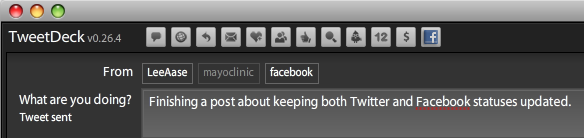
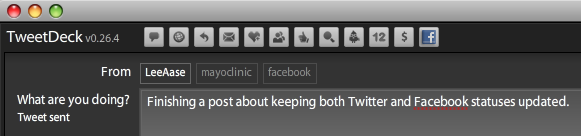
But here’s the way I currently prefer to work, using Tweetdeck. In Tweetdeck I can incorporate both of the Twitter accounts with which I work (@LeeAase and @mayoclinic) as well as my Facebook profile. That way I don’t have to be in Facebook or on the Twitter Web interface, but can update both simultaneously.

So I can select just to have updates sent to my personal Twitter account:

Picture 1

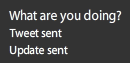
…or I can select to go both to Twitter and Facebook:

Picture 2

If I choose the latter, the Tweetdeck dashboard shows this:

Picture 5

And here’s what shows up on Facebook:

Picture 7

and on Twitter:

Picture 6

The nice part about having an application like Tweetdeck is that you can decide which messages are appropriate for which platform. And of course, as I say in Twitter 106 and in Twitter 152: Tweetcamp III, Tweetdeck or an application like it greatly increases your Twitter productivity.

I still don’t update my Facebook status as frequently as I should, but Tweetdeck makes it easier to keep the status updated without having to go to the Facebook Web interface.

How do you keep Twitter and Facebook statuses updated? Or do you even try to do both?

Social Media 210: Growing an Organ Donation Community

I’ve known Bob Aronson for nearly a decade, as I described here and here. As a heart transplant recipient, Bob is grateful for the additional years he has been given and has dedicated himself to promoting organ and tissue donation. And while his former career was in mainstream media relations, he’s taken to social media in his new vocation, with a blog called Bob’s NewHeart and a Facebook group as his main vehicles.

One of Bob’s goals is to get at least 5,000 members in that Facebook group, and to have people sharing their transplant and organ donation stories so their Facebook friends will realize how important donation is. In a recent email, he asked me for ideas on how he could increase the group membership (he’s had some recent success, as the group has grown from 300+ to 472 as I write this.)

Instead of responding by email, I thought it would be good to expand on my Seven Steps to Promoting Transplant through Social Media by adding some Twitter-related ideas, and also to throw it open to the SMUGgles for your additional thoughts.

To Bob’s credit, he has started a Twitter account (@bobsnewheart), which is an important way to connect with people who have common interests, and who you don’t yet know. I described this process and gave an example in Twitter 130: Listening with Twitter.

So here are my suggestions for how Bob can grow the Organ Transplant Patients, Families and Friends group in Facebook. And of course you can probably generalize the suggestions for particular applications you may have.

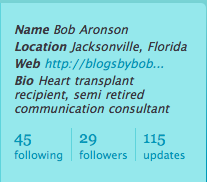
First, make the Web link associated with your Twitter profile the one that is your top priority, and that is most descriptive of you and your mission. So instead of his blogsbybob.wordpress.com URL, I would recommend that Bob feature either bobsnewheart.wordpress.com or the Facebook group.

picture-101

Second, start Tweeting about Transplant. Look for interesting articles and news stories on Web sites, and do brief posts on Twitter about them. Do it every day. This will help people who come across your Twitter profile understand what you’re all about, so as you engage in the next steps, they won’t consider your a Twitter spammer.

Third, apply Twitter 106 and Twitter 130 to your goals. Get Tweetdeck to make your interactions in Twitter much more efficient. Set up search tabs for “organ donation” and “transplant” as well as for Replies, Direct Messages and All Friends.

Fourth, Engage in Conversations. When you see an interesting Tweet in your search tabs, use Tweetdeck to follow the person, reply and — if you think it’s particularly interesting — re-tweet the post to your followers. As you get to know the individuals, you can invite them to join the Facebook group.

And you may find other valuable projects and initiatives with which you can connect. For example, you may find other people blogging about transplant that you can add to your blogroll; maybe they’re reciprocate. You may find other related Facebook groups that you would like to join.

The bottom line: if you’re focused on creating or passing along valuable, interesting content and making connections among like-minded people, you’ll be successful.

What other ideas do you have for growing a community?

Facebook Pages Get a Major Upgrade

Facebook’s Pages program for businesses and other organizations got a major upgrade this afternoon with the implementation of changes that make pages much more like a personal profile. In fact, I think they are now calling pages “Public Profiles.” And I have added emphasis below to Facebook’s description of what I think is the most important new benefit:

By leveraging the real connections between friends on Facebook, a public profile lets users connect to the entities they care about and allows you to join the conversation. Posts by the public profile will soon start to appear in News Feed, giving you a more dynamic relationship with the public figures and organizations you are interested in.

A big problem with Pages, as opposed to groups or personal profiles, has been that when an organization wants to send information to its “fans” it must send an “Update” as opposed to a message that goes in the regular Facebook Inbox. But most users rarely check their updates; at least not anywhere near as regularly as they view their Inboxes. This has significantly reduced the usefulness of Pages.

Here are some other specific highlights of the changes (again, with emphasis added):

Update and share: Like a user profile, your Page can now update its Fans with statuses—short text-only messages. Soon, these statuses will appear in Fans’ News Feeds.

Tabbed Structure: The tabbed structure multiplies your possibilities. Similar to their functionality in user Profiles, tabs help keep Pages organized so people know where to go to get different pieces of information. The Wall tab is for dynamic content, the Info tab has static information, the Photos tab contains photos albums and Fan photos, etc.

Wall: The Wall tab closely resembles the Wall tab on a user profile. You and your Fans can use the turnkey publisher tool in the main column to share comments and even rich media. Posts by your Page go to your Fans’ News Feeds, and comments by your Fans go to their friends’ News Feeds. Those posts will hyperlink back to your Page.

Facebook has a Step by Step Guide to the new pages that is helpful, and the Best Practices documents for each particular kind of page (Public Figures, Music & Bands and Communities) also provide good guidance.

Check out our Mayo Clinic fan page, which we have adapted and republished with the new format.

Another major improvement is the ability to use the Notes application to import blog posts into your organization’s Facebook public profile. So, for example, we are importing our Sharing Mayo Clinic blog posts into our Mayo Clinic page, which will help create more readership and engagement.

Updates to fans are still available, and can be targeted to certain demographic groups among your fans. So, in the case of Mayo Clinic if we have a notice that only affects one of our three campuses, we could limit the distribution of the update to residents of a certain state.

I understand if some organizations have spent significant time customizing the look of their Pages, that they would not immediately appreciate the changed look. That explains some of the early angst among commenters on the Facebook announcement. But overall it’s a really good thing for organizations to have functionality that feels similar to personal profiles.

And the inclusion of status updates within the news feeds of fans is valuable enough all by itself to make the new Facebook pages a much better value for organizations.

Especially since everything you see on the Mayo Clinic page, for instance, is free!

The big remaining question is:

How soon is “soon?” 

If public profile updates will “soon” be published to the news feed, I’m hoping “soon” means tomorrow or next week.

Anyone have any insight on how soon “soon” is?

[ratings]
Facebook 201: Secret Groups as Your Free Small Business Intranet

I have a friend who has become seriously SMUG and wants to use Facebook and other social media tools in her home-based marketing business. She has an organization involved in selling stuff, and wants to be able to communicate with people in her marketing network, which is widely dispersed geographically.

In essence, she would like to create an intranet without the corporate firewall.

If her team members all had a company email address (e.g. personname@companyname.com), Yammer would be a great solution, and you can read all about it in the Yammer curriculum here at SMUG.

But that’s not the case in many small or home-based businesses, nor is it for my friend.

Let’s call her “Terri” (since that’s her name). One of “Terri’s” concerns is that when she does business-oriented work on Facebook, the things she posts get all mixed in with her personal Facebook feed. And while her business activities may not be super secret, she would like to keep personal and work activities somewhat segregated.

A Secret Group in Facebook can be a good answer in this case.

To use this, though, everyone in your group needs to be a Facebook “friend” — at least until you have invited them into your secret group, although there is a workaround, as I will explain below.

Here are the three steps to creating your free small business intranet, assuming you have already created your Facebook account. (You have done that, haven’t you?)

Continue reading “Facebook 201: Secret Groups as Your Free Small Business Intranet”

“Please breathe slowly into the brown paper bag…”

There’s been a bit of hyperventilating today about a change in Facebook’s Terms of Service (TOS). For example, Stan Schroeder says (on Mashable):

Yes, with Facebook Connect in place, it’s likely that Facebook simply must do this in order to avoid possible lawsuits over content that isn’t even stored by them anymore. However, the same commenter rightfully notices that “…yes, it also means they can sell your photos or use them in advertising with no recompense to you.”


It’s not just your stuff, it’s everyone’s stuff


The possible implications of this TOS change go beyond these concerns. Sure, you can choose not to use Facebook at all, but that doesn’t mean a thing. Someone can still take your photo, slap it on Facebook, and now neither you nor the author of the photo can stop Facebook from using the photo in whichever way they please.

Looking at it globally, millions of people are uploading bits of information on everyone and everything, to a huge online database, and by doing so they’re automatically giving away the rights to use or modify this information to a private corporation. And not only that; they now also waiver (sic) the right to ever take it back from it.

Facebook should take a long, deep look into how it treats its users. Until now, users had options with regards to how the data they generated on Facebook was used. Now, they have no options whatsoever, rather than quit the service altogether. It’s a major difference; I’m not going to take it lightly, and neither should you.

Actually, Stan’s take is a bit less extreme than some I’ve seen; at least he recognizes the need with Facebook Connect for Facebook to protect itself from lawsuits.

But for the others who are expressing such extreme distress over the change, I have one main question, and a few related thoughts:

Do you really think the photos of you are that interesting?

Facebook users upload nearly a BILLION PHOTOS A MONTH! I overstated that a bit; it’s really 850 million, but I rounded up for effect.

If you were to decide to delete your photos, do you think Mark Zuckerberg & Co. will forage through their digital trash so they can show your picture to some user from China?

This language change seems to me to be strictly about preventing frivolous lawsuits. If I delete a photo, I’m betting it will stay deleted. No one else cares about it. This new language just says I can’t sue if it does somehow surface.

Maybe professional photographers who make their living from photos would possibly have some concern about the change. But for us run-of-the-mill amateurs, I don’t think we have any cause for distress.

Meanwhile, here’s a good article from Time you should check out (hat tip: Daniel Rothamel): Why Facebook is for Old Fogies.