Category: Social Media
FUEL Social Media Presentation
I had the opportunity late this afternoon to do a presentation to FUEL, a relatively new group sponsored by the Rochester, MN Chamber of Commerce, on “how to use social media to grow your business and advance your career.”
Here are the slides:
After my presentation, we had a panel discussion that included Wade Beavers and Joe Shriver of DoApp, Becky Ross of Fox Sports North and Fox Sports Wisconsin and Alan De Keyrel of Corporate Web Services.
We started a Twitter hashtag for Rochester community conversations, #RSTMN.
It was a great discussion with lots of good questions, and I appreciated the perspectives the other panelists brough. Becky made the great point the given the intensity of sports fans, it was important for @FSNorth to keep up a strong Twitter stream, because people who follow them. Alan beat me to the punch in saying that people need to stop thinking about the separation of personal and professional lives in social media, and realize that the distinction is really futile. I don’t think it’s even really desirable. Wade and Joe also brought a lot of good insights.
“Don’t Try This at Home…”
Normally when you hear a warning like that, the implication is that the task should only be done by a trained professional, not by amateurs.
I had a different experience of this admonition today as we were getting ready for Tweetcamp III. Instead of using a phone conference call or professional video Webcasting, as we had done for our first two tweetcamps, I thought it would be great to do this one via uStream.tv.
I even tested it “at home” Saturday night, with my very first ChancellorCast embedded here on SMUG.
It seemed like the perfect solution. Put the slides on Slideshare.net. Use the PC in the room to show the slides to the local audience, and use the built-in camera on my MacBook Pro to Webcast video and audio to the 100+ participants from all over the U.S. and Canada (and even one from the Netherlands.)
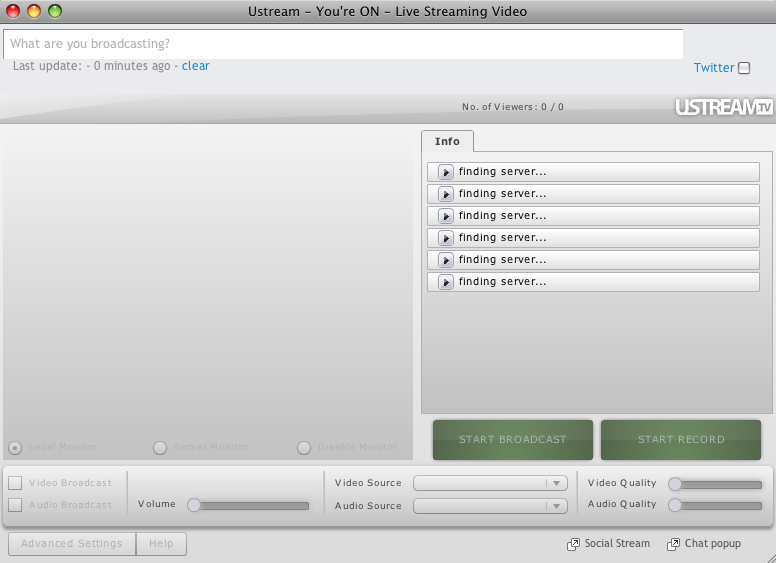
Unfortunately, when I went to uStream.tv at about 8 minutes before the scheduled start of #tweetcamp3, here’s what I saw when I hit the Broadcast Now button:
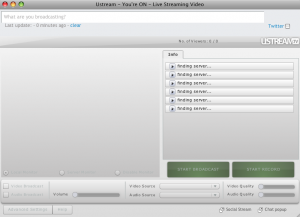
It said it was “Finding Server” but the reality was different.
So after trying to get through for about 7 minutes, at 1:59 CDT I decided we needed to revert to the audio conference method…and after a few hiccups with getting the right number and authorization code, we were able to get going about 2:13.
In some ways it was an interesting audio representation of the “Tribe” that had gathered, because for the better part of five minutes we had a popcorn-like sound of beeps as new callers joined.
It also showed the power of Twitter, in that by using the #tweetcamp3 hashtag we could get word to almost everyone, and switch probably more than 100 participants from video Webcast to phone conference in less than 15 minutes.
My takeaway: “Don’t try this at home” has a second meaning beyond the traditional. Just because something works at home in testing doesn’t mean it will work in a presentation. It’s important to do a run-through in the exact room where the presentation is taking place, and using all of the technology that will be used in the actual event.
I generally have my slides for presentations uploaded to Slideshare.net for two reasons:
- I don’t like to give out the presentation in hard copy, because I want to have people looking at me and the screen instead of their laps. I don’t want them reading ahead either. By having the presentation on Slideshare, I can tell them where they will be able to refer later, and we can just engage in discussion.
- In a pinch, I can present from the Web instead of my computer, so if for some reason my computer doesn’t talk nicely with the LCD projector I can use one that does.
It’s what grandpa used to do when he would wear both a belt and suspenders to ensure that his trousers stayed put.
It’s good that we had audio conferencing as another option. It would have been better to try the broadcast from within the room when I arrived there about 25 minutes before the program’s scheduled start. I just though that since I could get to uStream.tv from behind the firewall I wouldn’t have any problem connecting to the Video server.
I know better now.
And let this be a lesson to you, too.
Thanks to everyone who participated in Tweetcamp III today. I hope you found it helpful and worthwhile. I look forward to going through the #tweetcamp3 tweets and seeing what I can learn.
I won’t thank you for your patience, because I don’t know whether you were patient or not. Maybe you were secretly stewing. But at least nobody flamed me. So I’ll thank you for that, and for hanging in as we worked out the kinks.
Update 8:45 p.m. 7/13: I was able to record the video Webcast tonight, so now I think the Tweetcamp III post is a nice archive you could share with people you want to introduce to Twitter.
Twitter 152: Tweetcamp III
Here are the slides and the video Webcast window for Tweetcamp III (#tweetcamp3), which will be held Monday, July 13, 2009 from 3-4 EDT. Please note that the video window will not be live until the time of the program, but you may preview the slides if you wish.
Update 4:30 p.m. CDT July 13: We had some technical difficulties with uStream.tv (I’m fairly certain they were related to our firewall) so we had to do Tweetcamp III via phone conference instead of Webcast. I will probably do did an encore (or take a Mulligan) tonight from home that you can see below.
Update 7:30 p.m. CDT July 13: Hit play on the video below, and then you can follow along as I narrate the slides.
Here is the video window:
Credits:
- Shwen Gwee (@shwen) coined (to the best of my knowledge) the phrase “Tweet Cred.” A term that needs no explanation. It’s just perfect.
- Thanks to @vmontori @2healthguru @mrstreme @kamichat for providing real-time feedback during my first uStream.tv experiment. If we get the audio level right in Tweetcamp, it will be because of their help.
- In addition to those listed above (and @EdBennett, @LeeAase and @MayoClinic), here’s a baker’s dozen of additional health-related Tweeps you might want to consider following to get started in Twitter: @danamlewis, @MeredithGould, @DaphneLeigh, @tstitt, @stephaniethum, @healthblawg, @consultdoc, @lsaldanamd, @crgonzalez, @brendafinkle, @mkmackey, @HealthSocMed, @ReedSmith. As you see who they are re-tweeting, you’ll discover even more interesting people to follow.
- Finally, clicking this link to see the #tweetcamp3 chatter will identify some others with shared interests. After all, you all participated in the same event.
I welcome your feedback, either in the comments below or via a tweet using the #tweetcamp3 hashtag.
An Experiment with uStream.tv
On Monday I’m going to be presenting Tweetcamp III, and instead of a phone conference call or using our Mayo Clinic AV department resources am planning to do a video Webcast using uStream.tv.
So I’m doing a little experiment tonight, and embedding the code from my uStream program, which I’ve dubbed ChancellorCast, here on the SMUG site.
At 9:30 p.m. EDT/8:30 CDT/6:30 PDT tonight, I’m going to do a brief test of uStream, for about 10 or 15 minutes. If you’re able to see and hear me, I would appreciate it if you would leave a comment below.
I want to test this with a smaller group, so that for #tweetcamp3 we can have the kinks worked out.
Appreciate your feedback and help.
Update 9:15 CDT: Thanks to all who participated. I think you helped me prepare so we can have a good experience Monday. I’ve embedded a video below that I recorded with uStream, which gives a bit of an overview of Tweetcamp III.
