Twitter Email Alerts Much Less Useful After Change

Twitter has taken a minor but annoying step back in the usefulness of its email notifications.

I have selected relatively few types of email updates to receive from Twitter, but one of the ones I had appreciated was notification that someone has sent me a direct message. And in the old days (meaning maybe a month ago), the text of the direct message was sent along with the email.

In the last week or two that has changed, and not for the good. Here’s a message I got yesterday:
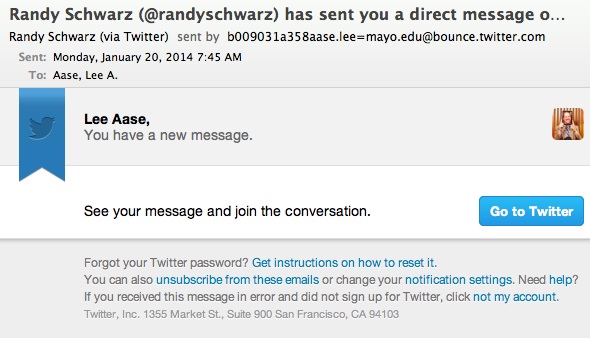
New message on Twitter

Really, Twitter? You send me the alert, and you purposefully removed the content of the message?

This looks like something done to increase page views on Twitter.com, but not thinking of the users and what they need or prefer.

It’s a minor annoyance, and I didn’t say anything at first. But after having this happen a few times, I decided to take a few minutes for a post, because it relates to a larger point that applies to all of us.

Think about the changes you make in your online interfaces, and how they serve (or may annoy) users.  Don’t make them work harder to get the information they need. You may have valid business reasons for your changes, but if you’re making withdrawals from your reservoir of customer good will and loyalty, the benefits may not be worth the cost.

Even more importantly, try not to get into these cost/benefit calculations. Just do the right thing for the customer (as Twitter generally has until this point.) Doing the right thing will be better for everyone (including you) in the long run.

I was disappointed to see Twitter swerve into this short-term thinking. It’s a good reminder for me to be sure that what we’re doing keeps users and their needs first.

Update (2/25/14): I just noticed that Twitter has returned to a more useful direct message email notification. Looking back through my deleted emails, it appears this happened back on Feb. 12 or 13.
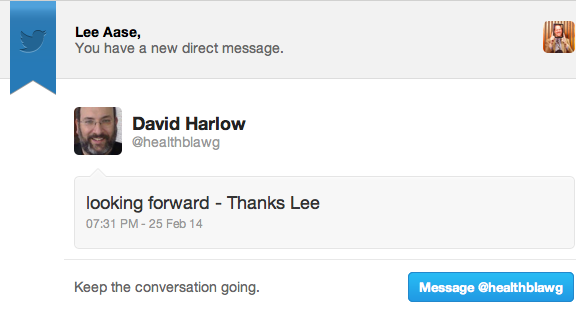
David Harlow DM

Good deal.


Email Flood Relief

81st Ave Oakland flooding
81st Ave Oakland flooding (Photo credit: mr. nightshade)

In the New York Times Bits blog, Nick Bilton has a thought-provoking piece called Disruptions: Looking for Relief from a Flood of Email.

He confesses filing email bankruptcy to get out from a mountain of 46,315 unread emails, and explores some reasons behind the phenomenon of email overload and burnout. He also highlights one creative (and less extreme than bankruptcy) solution:

Some people have come up with their own solutions to the problems email presents. Luis Suarez, lead social business enabler for IBM, decided to take on his inbox several years ago, and by all accounts seems to have won.

He said he had moved most of his communication to public and social platforms. When people contact Mr. Suarez by email, unaware that he is not a fan of that route, he scans their email signature for a social network they use and then responds in a public forum, whether on Twitter, Google Plus or LinkedIn. This way, he says, he can deal with several messages at once.

Over the last few years, he has managed to get his inbox down by 98 percent. He rarely uses email anymore.

“If email was invented today, it probably would not have survived as a technology,” Mr. Suarez said. “Social and public sites are much more efficient.”

I agree that social networks can be much more efficient, but taking email contents to public forums needs to be done with care and consultation. For example, sometimes I get questions by email, and I ask the sender if it’s OK to answer in public on SMUG or elsewhere. That makes the answers more accessible to others who may have the same questions, and also invites others to share their perspectives, which may be better than mine. But going public without permission is bad form, as I see it.

I also would recommend David Allen’s Getting Things Done for some good thoughts on avoiding the need for email bankruptcy. And while I have some basic disagreements with Timothy Ferriss

in The 4-Hour Workweek as it relates to the purpose and meaning of work, he does have some good tips on managing the email beast.

What do you think? How have you managed (or not) the rising tide of emails?

Enhanced by Zemanta

Sparking Innovation in South Carolina

I’m in Charletson today for the Medical University of South Carolina (MUSC) 16th Annual Healthcare Leadership conference, during which I will be part of a panel called “Employing Social Media to Build Customer Satisfaction & Community Outreach.” Our moderator is Jessica Munday and my fellow panelist is Elissa Nauful.

The conference theme is Sparking Innovation, so I’m glad to be able to share our Mayo Clinic experience with social media. Here are my slides:

Note that all of the links in the presentation above are clickable and will take you to the referenced resources.

For those wanting to get more involved, here are three helpful next steps:

  1. Create your free Guest account in our Mayo Clinic Social Media Health Network.
  2. Explore some of the free curriculum offerings (listed in bold or italic)
  3. If you’d like to join with us in Bringing the Social Media Revolution to Health Care, check out the membership options.

I welcome your comments or questions below.

Nice Delta Pick-Up!

Lisa and I had three flights yesterday on our way to Charleston, and while the first one didn’t start well, Delta made major service recovery points at MSP.

Our Rochester to MSP flight was scheduled to leave at 6:40 a.m., but when we got on the plane we were informed that the ground crew had somehow damaged one of the armrests the night before and had not reported it. While a fix wasn’t needed, there was the dreaded “we have to fill out the paperwork” announcement.

So at about 7:30 we backed from the gate, but with only a 20-minute flight to MSP, were still in good shape for our 9 a.m. connection to Atlanta. That’s when we heard hat because of the fog, landings in Minneapolis were being modulated and spaced further apart, so we were going to need to wait 30 minutes to take off.

Now we were getting nervous, and that only increased as our wheels finally left the Rochester runway at 8:10. Upon landing in MSP at 8:33 and while we were taxiing, and knowing that we had to go from C12 to G15, I direct tweeted @DeltaAssist asking if they could get the boarding door held open for maybe just 5 extra minutes, since ordinarily the door would close at 8:50. I got a message back asking for my ticket confirmation number, but just as we were exiting the door to the jetway we were surprised to see a helpful, smiling Delta agent holding an iPad with my name on it.

She asked if I had a gate-checked bag, and I spotted it on the cart on the tarmac, so she opened the door and told us to follow. Here’s what happened next:

So we went from one jetway directly to the other, and were in our seats on the ATL flight by 8:48.

I’m pretty sure this had nothing to do with @DeltaAssist; I think it’s more a case of others’ connections being completely blown and the gate agent in MSP knowing that we could still make ours.

For a couple of other examples of Delta service (one that did involve @DeltaAssist) go here and here.


Colon Cancer Alliance Presentation

I’m in Miami this morning for the Colon Cancer Alliance National Conference. Below are the slides I will be presenting.

One of the things I’m excited to share with this group is the Patient Advocate Associate memberships as well as the free guest accounts we now have available in the Social Media Health Network.

I look forward to the discussion!