Social Media 210: Growing an Organ Donation Community

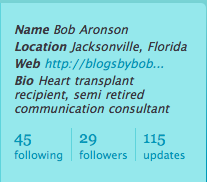
I’ve known Bob Aronson for nearly a decade, as I described here and here. As a heart transplant recipient, Bob is grateful for the additional years he has been given and has dedicated himself to promoting organ and tissue donation. And while his former career was in mainstream media relations, he’s taken to social media in his new vocation, with a blog called Bob’s NewHeart and a Facebook group as his main vehicles.

One of Bob’s goals is to get at least 5,000 members in that Facebook group, and to have people sharing their transplant and organ donation stories so their Facebook friends will realize how important donation is. In a recent email, he asked me for ideas on how he could increase the group membership (he’s had some recent success, as the group has grown from 300+ to 472 as I write this.)

Instead of responding by email, I thought it would be good to expand on my Seven Steps to Promoting Transplant through Social Media by adding some Twitter-related ideas, and also to throw it open to the SMUGgles for your additional thoughts.

To Bob’s credit, he has started a Twitter account (@bobsnewheart), which is an important way to connect with people who have common interests, and who you don’t yet know. I described this process and gave an example in Twitter 130: Listening with Twitter.

So here are my suggestions for how Bob can grow the Organ Transplant Patients, Families and Friends group in Facebook. And of course you can probably generalize the suggestions for particular applications you may have.

First, make the Web link associated with your Twitter profile the one that is your top priority, and that is most descriptive of you and your mission. So instead of his blogsbybob.wordpress.com URL, I would recommend that Bob feature either bobsnewheart.wordpress.com or the Facebook group.
picture-101

Second, start Tweeting about Transplant. Look for interesting articles and news stories on Web sites, and do brief posts on Twitter about them. Do it every day. This will help people who come across your Twitter profile understand what you’re all about, so as you engage in the next steps, they won’t consider your a Twitter spammer.

Third, apply Twitter 106 and Twitter 130 to your goals. Get Tweetdeck to make your interactions in Twitter much more efficient. Set up search tabs for “organ donation” and “transplant” as well as for Replies, Direct Messages and All Friends.

Fourth, Engage in Conversations. When you see an interesting Tweet in your search tabs, use Tweetdeck to follow the person, reply and — if you think it’s particularly interesting — re-tweet the post to your followers. As you get to know the individuals, you can invite them to join the Facebook group.

And you may find other valuable projects and initiatives with which you can connect. For example, you may find other people blogging about transplant that you can add to your blogroll; maybe they’re reciprocate. You may find other related Facebook groups that you would like to join.

The bottom line: if you’re focused on creating or passing along valuable, interesting content and making connections among like-minded people, you’ll be successful.

What other ideas do you have for growing a community?

Honoring a Mayo Clinic Innovator

Dr. Earl Wood, who helped Mayo Clinic pioneer heart surgery and also invented the G-suit that made high-altitude flight and space travel possible, died this week at age 97. You can read about him and see a documentary about his work here on the Mayo Clinic News Blog.

As I was searching for some related links for that post (as part of my “day” job), I came across the documentary you see below, which won the “Legacy Award” from the Minnesota Historical Society’s Greatest Generation Film Contest in 2008. For technical reasons, I couldn’t embed this in the News Blog post, so I decided to do it here, to honor a great inventor who made a difference.


Inventing the G-suit: The Life story of Dr. Earl Wood from Dusty Road Productions on Vimeo.

Yammer 111: Twitter-Yammer Integration with #yam

Thanks to @tomburket for the heads up this morning on this new Yammer feature, as described in the Yammer blog:

You can now import your Twitter updates into Yammer, using the #yam tag. After linking your Yammer and Twitter accounts, any tweet (message posted to Twitter) that contains the #yam tag will be automatically imported into your Yammer network.

The Yammer blog gives instructions for how to do this. It’s really simple. Tom got the tip about the new feature, which was announced yesterday, from @steverubel.

Initial thoughts:

This was really easy. I got the direct message from Tom about this on Twitter at 7, checked it out a couple of minutes later and adjusted my Yammer account settings. Then I sent a test #yam tweet at 7:08.

It works well. My test #yam tweet showed up in my Yammer feed at 7:09. Here it is (click to enlarge):

picture-14

This will be good for Yammer. It makes it much more likely that #yam will be a trending topic in Twitter search, at least as people test it, which will increase Yammer’s visibility in the Twittersphere.

It may also be a practical way to ensure that messages you are sending outside your company are also communicated to work colleagues. For example, there may be things I tweet about that don’t interest my team members at work. Hard to imagine, I know. But if they follow me on Yammer, and if I tag posts with the #yam tag if I want to be sure they get them, I can share both externally to the world and specifically to teammates…without having to go to Yammer and send a separate message. It could increase the signal-to-noise ratio for my colleagues, while also making it simpler for me to share information.

Assignment:

  1. Join Yammer if you haven’t. (See Yammer 101)
  2. Adjust your Yammer account settings to add your Twitter account name. (You do have a Twitter account, right? If not, check out Twitter 102)
  3. After you’ve completed the first two steps (and any necessary remedial studies!), send a tweet with the #yam tag (in Twitter) and watch it show up in your Yammer feed.
  4. Share your thoughts about this new Yammer feature in the comments below.

Is SxSW Swamping TwitPic? Or is TwitPic just Unreliable?

Until yesterday, my experience with TwitPic had been quite good. If you’re not familiar, TwitPic is a utility that lets you upload pictures from your iPhone (if it’s available for Blackberry, please let me know) to Twitter using clients like Twitterific or Twittelator, and publish a link to the photo as part of your tweet. TwitPic was profiled in Twitter 121.

For example, it worked well on Saturday when I attended the Austin boys’ section semifinal basketball game at Rochester’s Mayo Civic Center, and uploaded a picture just after the game started. Here was my tweet:

picture-10

And the photo was just as I had expected.

But yesterday I experienced something, as Monty Python would say, “completely different.”

I snapped a picture of a slide from presentation I was watching, and uploaded it with this tweet:

picture-6

Let’s just say the photo my Tweeps saw when they clicked the link wasn’t what I had uploaded.  (The second time it worked.)

A similar thing happened a bit later when I took a photo of a a former colleague during our dinner:

picture-7

Here was the photo that showed up:

picture-8

That picture doesn’t look anything like Chris! And it gives the impression that he was having digestive difficulties. 😉

I’ve heard that all the iPhone users at South by Southwest (SxSW) 2009 have overwhelmed the network capacity at the location with their TweetingDo you think this might have had anything to do with the TwitPic failures I experienced yesterday? That maybe lots of pictures were being uploaded at once, and somehow the links got switched? Have you had any problems with TwitPic?

I know that based on this experience I’m going to be extremely reluctant to upload work-related photos to TwitPic, until I find out what caused this problem and what has been done to resolve it. If you can’t trust that the photo you’re uploading will be the one linked in your Tweet, how can you use TwitPic?

TwitPic = FAIL

Patients and Social Media

In many ways, SMUG has been my personal laboratory for learning about social media and how I can apply these tools to my work at Mayo Clinic. I’ve been able to experiment with blogs, Facebook, Twitter, YouTube and other platforms with my personal accounts, which then helps me see how they can be used for a health care provider like Mayo Clinic.

So we’ve established a Mayo Clinic YouTube channel, a Facebook page, and several podcasts and blogs — including, most recently, Sharing Mayo Clinic.

As of Friday the 13th, however, I’m also approaching social media from the patient perspective: yesterday I was diagnosed as having celiac disease.

So what did I do to find good information about how to cope?

My first step, of course, was the celiac disease section on MayoClinic.com.

And I recalled that my team at work had produced a TV story about living with celiac disease, which is also on our Mayo Clinic YouTube channel:

[youtube=http://www.youtube.com/watch?v=yGmWf0et4hg] 

But I also turned to Twitter, and was amazed at the response.

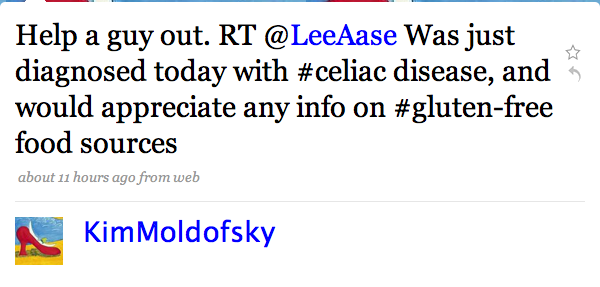
@KimMoldofsky re-tweeted my call for help:

kimtweet

Bonnie Sayers (@autismfamily) alerted me to the #gfree hashtag and the Gluten Free Twitter Party she’s hosting on April 3.

Gluten Free Twitter Party

@FrannLeach shared a Gluten Intolerance group on Squidoo, along with some recipes.

Kayla Eubanks (@BallinOnABudget) told me about Pizza Fusion, and Nina (@lovingyouiseasy) pointed me to @wholefoods and @KarinasKitchen. Karina’s “The Morning after the Diagnosis” post on her blog was particularly helpful. Kristie S. (@KristieTweets) had a couple of suggestions, and Tom Stitt (@tstitt) helped me get an answer as to whether Coke is OK (it is!) I also found out about lots of resources available at celiac.com.

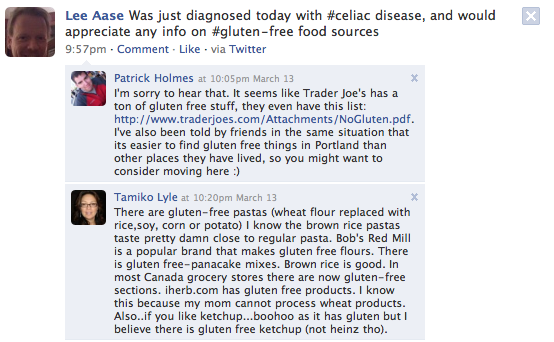
And because I Tweeted about it, my celiac disease diagnosis also was posted to my Facebook profile:

picture-19

…which led to several Wall comments (including a couple you see above that came within a half hour of my Tweet), and also some messages in my Facebook inbox. And I also found a Celiac Disease group in Facebook.

Some people are justifiably concerned about potential dangers of self-diagnosis through the Internet, but once a diagnosis has been made, social media tools are extremely powerful means of getting information and gathering support. 

As I write this, I’ve had my diagnosis of celiac disease for about 34 hours, and the learning about the condition I’ve been able to do in this time has been amazing.

And out of this experience, I’m also going to be getting my wife Lisa (@LisaAase) to use her Twitter account to participate in the #gfree discussions. She set up her account nearly two years ago, but has only done a dozen updates. And right now I’m her only follower. But now she has a reason to use Twitter, and I think she’s going to find it helpful in learning how we deal with gluten in our family diet.