Is SxSW Swamping TwitPic? Or is TwitPic just Unreliable?

Until yesterday, my experience with TwitPic had been quite good. If you’re not familiar, TwitPic is a utility that lets you upload pictures from your iPhone (if it’s available for Blackberry, please let me know) to Twitter using clients like Twitterific or Twittelator, and publish a link to the photo as part of your tweet. TwitPic was profiled in Twitter 121.

For example, it worked well on Saturday when I attended the Austin boys’ section semifinal basketball game at Rochester’s Mayo Civic Center, and uploaded a picture just after the game started. Here was my tweet:

picture-10

And the photo was just as I had expected.

But yesterday I experienced something, as Monty Python would say, “completely different.”

I snapped a picture of a slide from presentation I was watching, and uploaded it with this tweet:

picture-6

Let’s just say the photo my Tweeps saw when they clicked the link wasn’t what I had uploaded.  (The second time it worked.)

A similar thing happened a bit later when I took a photo of a a former colleague during our dinner:

picture-7

Here was the photo that showed up:

picture-8

That picture doesn’t look anything like Chris! And it gives the impression that he was having digestive difficulties. 😉

I’ve heard that all the iPhone users at South by Southwest (SxSW) 2009 have overwhelmed the network capacity at the location with their TweetingDo you think this might have had anything to do with the TwitPic failures I experienced yesterday? That maybe lots of pictures were being uploaded at once, and somehow the links got switched? Have you had any problems with TwitPic?

I know that based on this experience I’m going to be extremely reluctant to upload work-related photos to TwitPic, until I find out what caused this problem and what has been done to resolve it. If you can’t trust that the photo you’re uploading will be the one linked in your Tweet, how can you use TwitPic?

TwitPic = FAIL
Patients and Social Media

In many ways, SMUG has been my personal laboratory for learning about social media and how I can apply these tools to my work at Mayo Clinic. I’ve been able to experiment with blogs, Facebook, Twitter, YouTube and other platforms with my personal accounts, which then helps me see how they can be used for a health care provider like Mayo Clinic.

So we’ve established a Mayo Clinic YouTube channel, a Facebook page, and several podcasts and blogs — including, most recently, Sharing Mayo Clinic.

As of Friday the 13th, however, I’m also approaching social media from the patient perspective: yesterday I was diagnosed as having celiac disease.

So what did I do to find good information about how to cope?

My first step, of course, was the celiac disease section on MayoClinic.com.

And I recalled that my team at work had produced a TV story about living with celiac disease, which is also on our Mayo Clinic YouTube channel:

[youtube=http://www.youtube.com/watch?v=yGmWf0et4hg] 

But I also turned to Twitter, and was amazed at the response.

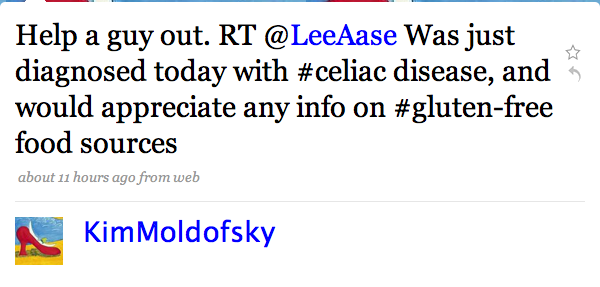
@KimMoldofsky re-tweeted my call for help:

kimtweet

Bonnie Sayers (@autismfamily) alerted me to the #gfree hashtag and the Gluten Free Twitter Party she’s hosting on April 3.

Gluten Free Twitter Party

@FrannLeach shared a Gluten Intolerance group on Squidoo, along with some recipes.

Kayla Eubanks (@BallinOnABudget) told me about Pizza Fusion, and Nina (@lovingyouiseasy) pointed me to @wholefoods and @KarinasKitchen. Karina’s “The Morning after the Diagnosis” post on her blog was particularly helpful. Kristie S. (@KristieTweets) had a couple of suggestions, and Tom Stitt (@tstitt) helped me get an answer as to whether Coke is OK (it is!) I also found out about lots of resources available at celiac.com.

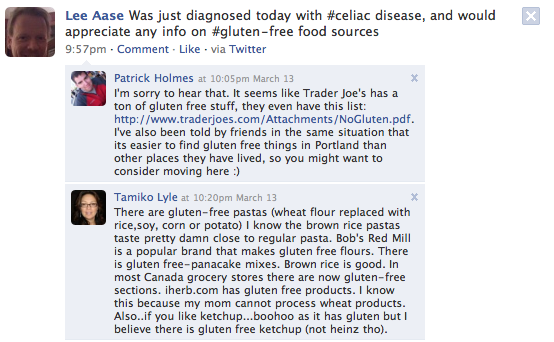
And because I Tweeted about it, my celiac disease diagnosis also was posted to my Facebook profile:

picture-19

…which led to several Wall comments (including a couple you see above that came within a half hour of my Tweet), and also some messages in my Facebook inbox. And I also found a Celiac Disease group in Facebook.

Some people are justifiably concerned about potential dangers of self-diagnosis through the Internet, but once a diagnosis has been made, social media tools are extremely powerful means of getting information and gathering support. 

As I write this, I’ve had my diagnosis of celiac disease for about 34 hours, and the learning about the condition I’ve been able to do in this time has been amazing.

And out of this experience, I’m also going to be getting my wife Lisa (@LisaAase) to use her Twitter account to participate in the #gfree discussions. She set up her account nearly two years ago, but has only done a dozen updates. And right now I’m her only follower. But now she has a reason to use Twitter, and I think she’s going to find it helpful in learning how we deal with gluten in our family diet.

Twitter 130: Listening with Twitter

In Twitter 107, I compared two desktop applications for improving your Twitter interactions: Tweetdeck and Twhirl.

In this course, I will take you through a case study of what can happen when you listen and engage through Twitter.

Several months ago, I set up a Twitter search for the term “mayo clinic” and subscribed to the RSS feed. And frankly, for quite a while the feed wasn’t all that interesting. Mayo Clinic wasn’t mentioned very often on Twitter, probably because Twitter’s earliest adopters skewed younger and male, at least as compared to the typical health care consumer or decision maker.

That’s recently changed quite a bit, though, especially as Twitter has reportedly grown by 33 percent in the last month. While the Tweet volume is still nowhere near what Comcast experiences, for example, we’re at least seeing a dozen or more Mayo Clinic tweets a day. 

So as I set up my Tweetdeck to be more intentional and regular in listening on Twitter, I created one pane to monitor the “Mayo Clinic” search. (I had previously used the Twilert service, which sends you a daily email with the tweets that match your search criteria, but wanted to be more responsive than a daily email digest would allow.)

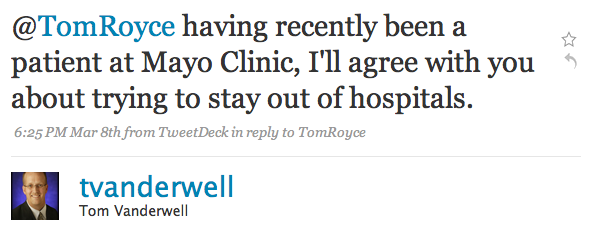
I was somewhat surprised last Sunday night to see the following Tweet from a gentleman named Tom Vanderwell, who goes by @tvanderwell on Twitter:

toms-first-mayo-tweet

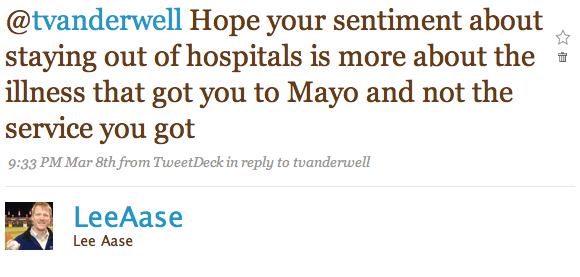
I wasn’t sure what to make of this. Was that a negative comment or a positive one? So I replied to Tom’s Tweet with:

leetotom1

Much to my relief, Tom’s response was:

tom2lee1

After clicking through to Tom’s Twitter profile, I found out he was from Grand Rapids, Michigan. As we exchanged replies and eventually direct messages, I mentioned that I was going to be at a conference in Grand Rapids this Wednesday. It turns out the convention was right across the street from his office, so we arranged for a real-life meeting Wednesday morning (a picture from which I posted, of course, using Twitpic).

Share photos on twitter with Twitpic

In a future post I will profile Tom and how he’s using social media in his mortgage banker business, particularly with his Straight Talk about Mortgages and Real Estate blog. But for now, let me just say that we had a delightful conversation and were able to connect in a way that wouldn’t have been possible without Twitter. 

What’s your favorite example of a Tweetup? When have you been able to meet someone in real life, either a brand-new friend you made through social media, or someone you’ve known virtually for a while but only later got to meet face to face?

Facebook Pages Get a Major Upgrade

Facebook’s Pages program for businesses and other organizations got a major upgrade this afternoon with the implementation of changes that make pages much more like a personal profile. In fact, I think they are now calling pages “Public Profiles.” And I have added emphasis below to Facebook’s description of what I think is the most important new benefit:

By leveraging the real connections between friends on Facebook, a public profile lets users connect to the entities they care about and allows you to join the conversation. Posts by the public profile will soon start to appear in News Feed, giving you a more dynamic relationship with the public figures and organizations you are interested in.

A big problem with Pages, as opposed to groups or personal profiles, has been that when an organization wants to send information to its “fans” it must send an “Update” as opposed to a message that goes in the regular Facebook Inbox. But most users rarely check their updates; at least not anywhere near as regularly as they view their Inboxes. This has significantly reduced the usefulness of Pages.

Here are some other specific highlights of the changes (again, with emphasis added):

Update and share: Like a user profile, your Page can now update its Fans with statuses—short text-only messages. Soon, these statuses will appear in Fans’ News Feeds.

Tabbed Structure: The tabbed structure multiplies your possibilities. Similar to their functionality in user Profiles, tabs help keep Pages organized so people know where to go to get different pieces of information. The Wall tab is for dynamic content, the Info tab has static information, the Photos tab contains photos albums and Fan photos, etc.

Wall: The Wall tab closely resembles the Wall tab on a user profile. You and your Fans can use the turnkey publisher tool in the main column to share comments and even rich media. Posts by your Page go to your Fans’ News Feeds, and comments by your Fans go to their friends’ News Feeds. Those posts will hyperlink back to your Page.

Facebook has a Step by Step Guide to the new pages that is helpful, and the Best Practices documents for each particular kind of page (Public Figures, Music & Bands and Communities) also provide good guidance.

Check out our Mayo Clinic fan page, which we have adapted and republished with the new format.

Another major improvement is the ability to use the Notes application to import blog posts into your organization’s Facebook public profile. So, for example, we are importing our Sharing Mayo Clinic blog posts into our Mayo Clinic page, which will help create more readership and engagement.

Updates to fans are still available, and can be targeted to certain demographic groups among your fans. So, in the case of Mayo Clinic if we have a notice that only affects one of our three campuses, we could limit the distribution of the update to residents of a certain state.

I understand if some organizations have spent significant time customizing the look of their Pages, that they would not immediately appreciate the changed look. That explains some of the early angst among commenters on the Facebook announcement. But overall it’s a really good thing for organizations to have functionality that feels similar to personal profiles.

And the inclusion of status updates within the news feeds of fans is valuable enough all by itself to make the new Facebook pages a much better value for organizations.

Especially since everything you see on the Mayo Clinic page, for instance, is free!

The big remaining question is:

How soon is “soon?” 

If public profile updates will “soon” be published to the news feed, I’m hoping “soon” means tomorrow or next week.

Anyone have any insight on how soon “soon” is?

[ratings]